> For the complete documentation index, see [llms.txt](https://docs.lorric.com/qr/llms.txt). Markdown versions of documentation pages are available by appending `.md` to page URLs; this page is available as [Markdown](https://docs.lorric.com/qr/fp-as310-paddle-wheel-flowmeter-manual-en-v1/communication/oct-output-setup.md).
# NPN output
## **Specifications**
#### **NPN Output**
| Power supply spec | 24V |
| -------------------------- | ----- |
| Reverse voltage protection | Yes |
| PNP connection | No |
| Maximum output frequency | 700Hz |
| Overcurrent protection | 200mA |
## Wiring
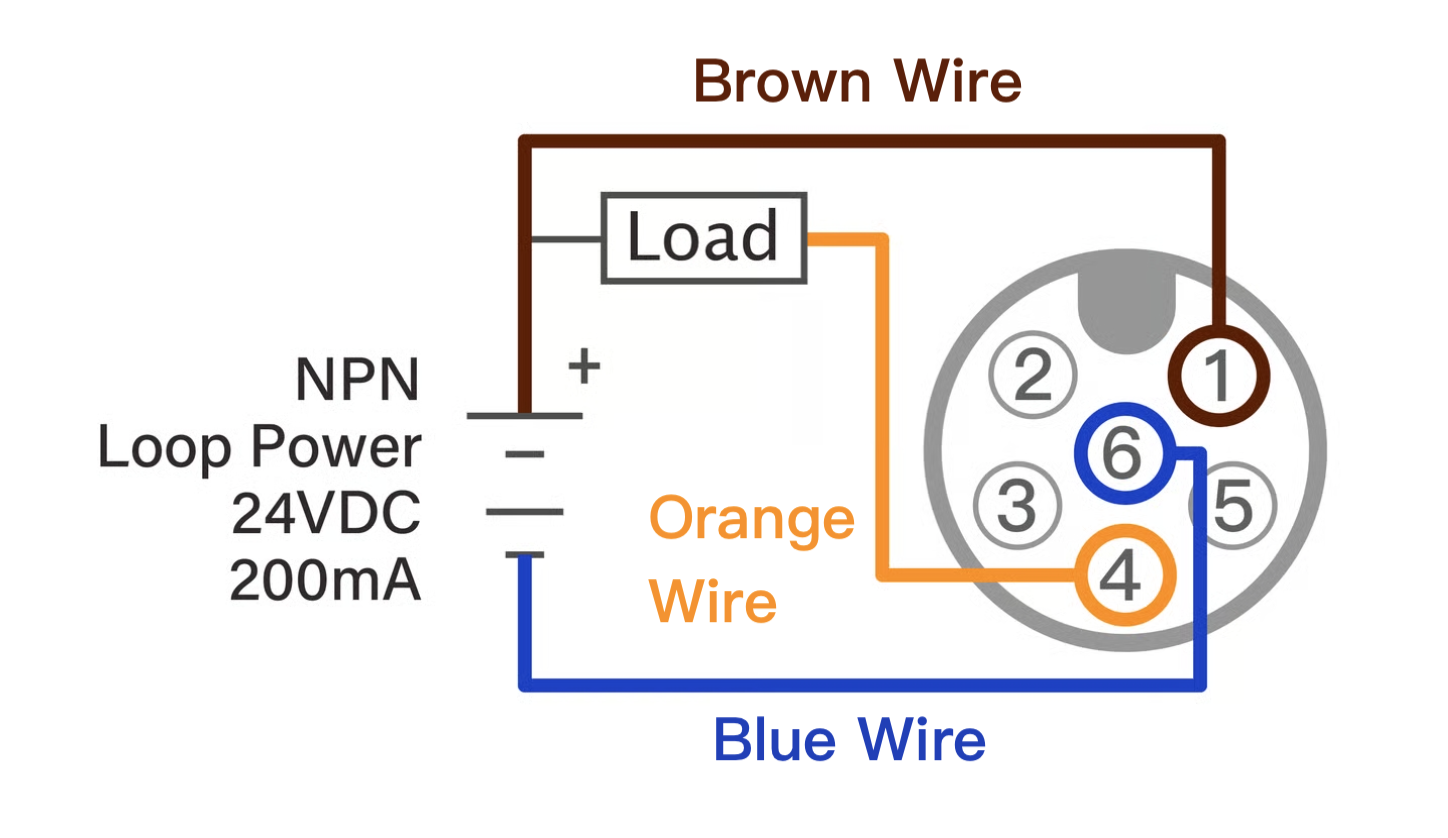
#### NPN Output Wiring Diagram
* **Brown:** 24 VDC (+), **Blue:** 0 VDC (–), **Orange:** NPN Output (+)
This function operates only when the brown and blue lines are powered by a DC supply.
## NPN Parameter Configuration
Follow the steps below to configure NPN output parameters:
{% stepper %}
{% step %}
### Set Basic Parameters
* Refer to the [**Parameter Settings**](/qr/fp-as310-paddle-wheel-flowmeter-manual-en-v1/installation-and-setup/parameter-setup.md) page and complete the following steps: **Language Setting** (H04 Language)**, Pipe Settings** (A01 Pipe Type)**, Unit Settings:** (B01 Vol. Unit), (B02 Time Unit), (B03 Total Unit), (A08 Pipe Material)
{% endstep %}
{% step %}
### **Wiring Setup**
Connect the NPN output wiring according to the instructions on this page.
{% endstep %}
{% step %}
### **E01 – NC/NO (Normally Closed or Normally Open)**
Set parameter **E01 NC/NO** to select the default state:
* **NC (Normally Closed):** Conducting when idle
* **NO (Normally Open):** Open when idle
{% endstep %}
{% step %}
### **E02 – OCT Definition (Output Signal Type)**
Set parameter **E02 OCT Info** to specify the output signal.
* If “Pulse Output” is selected:
* Use **E03 Pulse Width** to set the duration of each pulse.
* Use **F03** to activate the **pulse simulation function** and verify that the **receiving device correctly detects the pulse count**.
* If “Pulse V2” is selected:
* Use **E03 Pulse Width** to set the duration of each pulse.
* Use **E14 Pulse V2 Unit** to define the capacity represented by each pulse.
* Use **F03** for **pulse simulation**, and confirm the signal is correctly received by the downstream system.
* If selecting "Flow Out-of-Range Notification":
* Use **D04** to **enable the alarm**.
* Use **D05** and **D06** to set the **acceptable flow range**.
* Use **D07** to set **hysteresis control** — a positive value will reduce the likelihood of repeated alerts by adding a delay buffer.
* Use **simulation parameters F01 and F02**, then return to the main screen to confirm the **alarm functions as expected**.
* **Turn off simulation** once confirmed.
* If selecting "Cumulative Flow Exceeded Notification":
* Use **D08** to **enable the alert**.
* Use **D09** to define the **trigger condition**:
* “Greater than” for **positive flow**
* “Less than” for **negative flow**
* Use **D10** to define the **target cumulative volume**:
* Positive values for **positive flow direction**
* Negative values for **reverse flow direction**
* Use **F01 and F02** to simulate, and return to the main screen to verify **alarm operation**.
* **Turn off simulation** after verification.
* If “Total Alarm” is selected:
* Use **D09 Total Alarm** to enable the alarm.
* Use **D10 Total Trig.** to set the trigger condition:
* **“Greater than Target”** for forward flow
* **“Less than Target”** for reverse flow
* Use **D11 Total Target** to specify the cumulative target:
* Positive value for forward flow
* Negative value for reverse flow
(See Note 1)
* If “Flow Alarm” is selected:
* Use **D05 FlowLIM Alarm** to enable the flow range alarm.
* Use **D06 UP LIM** (Upper Limit) and **D07 Low LIM** (Lower Limit) to define the normal flow range.
> **Note:** If either **D06** or **D07** is adjusted, the other must also be set; otherwise, the display may not function correctly. If both are unset, default values are **D06 = 100**, **D07 = 0**.
* Use **D08 Hysteresis** to define the hysteresis operation method. Values must be positive and expressed as a percentage; larger values reduce repeated alarm triggers.
(See Note 2)
{% endstep %}
{% step %}
### Return to the main screen. Complete.
{% endstep %}
{% endstepper %}
### **Pulse Output**
The **pulse output** function provides a **direct count of paddlewheel rotations**.\
One **pulse** is generated for every **180 degrees of paddlewheel rotation**.
At a flow velocity of **10 m/s**, the **maximum output frequency** will not exceed **300 Hz**.
As this output **does not utilise LORRIC’s internal data processing algorithms**, it is **recommended for use in applications where high precision is not required**.
To calculate totalised flow over a given period, simply **divide the number of received pulses by the scale factor corresponding to the pipe size**.\
Please refer to the following reference data for scale values.
## Plastic (PVC, PP, PVDF) T-connector
| Pipe diameter | Model | Metric ratio (pulses per litre) | US Gallon (pulses per US gal) | UK Gallon (pulses per UK gal) |
| ------------- | ------- | ------------------------------- | ----------------------------- | ----------------------------- |
| 1/2" | FP-P016 | 106.55 | 403.33 | 484.38 |
| 3/4" | FP-P020 | 67.23 | 254.48 | 305.62 |
| 1" | FP-P025 | 53.33 | 201.89 | 242.46 |
| 1-1/4" | FP-P032 | 24.44 | 92.51 | 111.11 |
| 1-1/2" | FP-P040 | 17.02 | 64.43 | 77.38 |
| 2" | FP-P050 | 9.86 | 37.31 | 44.81 |
| 2-1/2" | FP-P065 | 5.42 | 20.52 | 24.64 |
### Pulse V2 Output
{% hint style="info" %}
This feature has undergone **limited scenario testing** and is currently in the **public testing phase**.\
**Please thoroughly test and carefully assess suitability** before deploying it in operational environments.
{% endhint %}
**Pulse V2** is a proprietary feature developed by **LORRIC**, based on its patented **AxleSense** technology.
This advanced algorithm allows users to define a **fixed volume per pulse**, and the system will generate **one pulse each time the specified volume passes through** the meter.
In addition, the system **intelligently compensates for low-flow discrepancies**, further reducing pulse output error.
Compared to traditional pulse output — which simply emits a pulse each time the paddlewheel blade passes the sensor — **Pulse V2 offers two key advantages**:
1. **Easier configuration for users**, as volume-based pulses are more intuitive when setting up controllers.
2. **Improved accuracy at low flow rates**, due to built-in compensation logic.
---
# Agent Instructions
This documentation is published with GitBook. GitBook is the documentation platform designed so that both humans and AI agents can read, navigate, and reason over technical content effectively. Learn more at gitbook.com.
## Querying This Documentation
If you need additional information that is not directly available in this page, you can query the documentation by asking a question.
Perform an HTTP GET request on the following URL with the `ask` and `goal` query parameters:
```
GET https://docs.lorric.com/qr/fp-as310-paddle-wheel-flowmeter-manual-en-v1/communication/oct-output-setup.md?ask=&goal=
```
`ask` is the immediate question: it should be specific, self-contained, and written in natural language.
`goal` is what the user is ultimately trying to achieve, the reason they need the answer. Sharing it helps GitBook give you a better, more relevant answer. A goal is most helpful when it describes the outcome the user wants rather than restating the question. For example, with `ask=how do I create an API token`, a goal like `automate deployments from our CI pipeline` lets GitBook tailor the answer to that use case.
The response will contain a direct answer to the question and relevant excerpts and sources from the documentation.
Use this mechanism when the answer is not explicitly present in the current page, you need clarification or additional context, or you want to retrieve related documentation sections.