RS485 Modbus RTU
RS485 is enabled only in the Main Screen state. When the device is in a settings or parameter editing screen, RS485 will not respond to any Modbus commands.
Specifications
Baud Rate
9600, 19200, 38400, 57600
Wiring
2-wire
Maximum Nodes on the Same Network
256
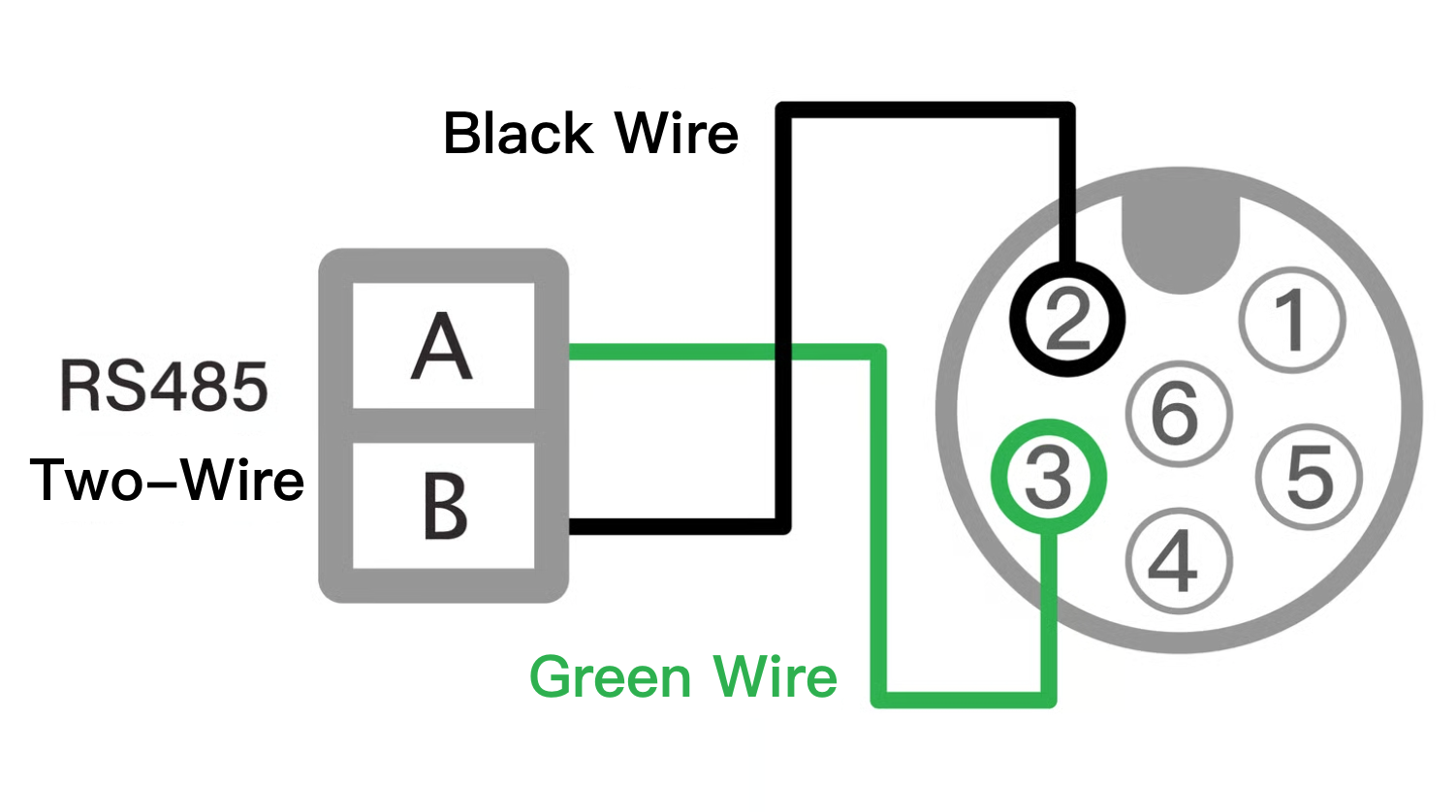
RS485 2-Wire Wiring Diagram
Black: RS485 (B−), Green: RS485 (A+)
This function operates only when the brown and blue lines of the DC power supply are powered. For clarity, the DC power lines are omitted in this diagram. Refer to the DC Power Wiring Diagram for details.
Do not confuse RS485 wiring with the power lines; miswiring may damage the device, and repair costs are the user’s responsibility.

Wiring Recommendations
Use 24 AWG shielded twisted pair for RS485, daisy-chaining each device. Avoid ring or star topologies.
For long runs, place termination resistors (typically 120 Ω) at the master and far-end device; adjust based on cable specs.
If communication is unstable, add bias resistors near the master to improve signal stability.
For 6-core cables, trim to the minimum required length and connect the shield to ground.
In areas with heavy interference, implement multiple query retries in software to distinguish signal noise from device offline errors.
RS485 Modbus RTU Parameter Configuration
Follow the steps below to configure RS485 Modbus RTU parameters:
Set Basic Parameters
Refer to the Parameter Settings page and complete the following steps: Language Setting, Pipe Settings:A02: Pipe Standard, A04: Pipe Outer Diameter, A06: Pipe Wall Thickness, A08: Pipe Material
Execute Z03 (Automatic Initialization).
Test Read/Write Memory
Refer to the Modbus RTU Protocol to test the memory for reading and writing.
Communication Format
bit order: lsb first byte order: big endian Data bits: 8 Parity: None Stop bits: 1
Floating point number follows IEEE754-1985. The float32 below stands for 32bits Single precision floating point number.
Memory Definition and Function
Modbus-accessible memory is divided into two types: Read-Only (RO) and Read/Write (RW).
Read-Only Memory (RO):
Primarily stores flowmeter status information, such as real-time flow.
This type is the most commonly used memory.
Can only be read using function code 04.
Read/Write Memory (RW):
Primarily stores flowmeter configuration parameters.
Each write operation can only modify one parameter at a time.
If the parameter occupies 1 register, use function code 06.
If the parameter occupies 2 registers, use function code 30.
In Modbus RTU communication, a Register is the basic unit for memory communication, with a length of 2 bytes (16 bits). A Byte is the basic unit for data transmission, with a length of 8 bits.
Modbus RTU Example – Reading Float32 Data
Using a Read-Only memory read command (04) as an example, this section explains how to send a command and parse the returned data into a decimal value when the accumulated flow is 20,000.5 liters.
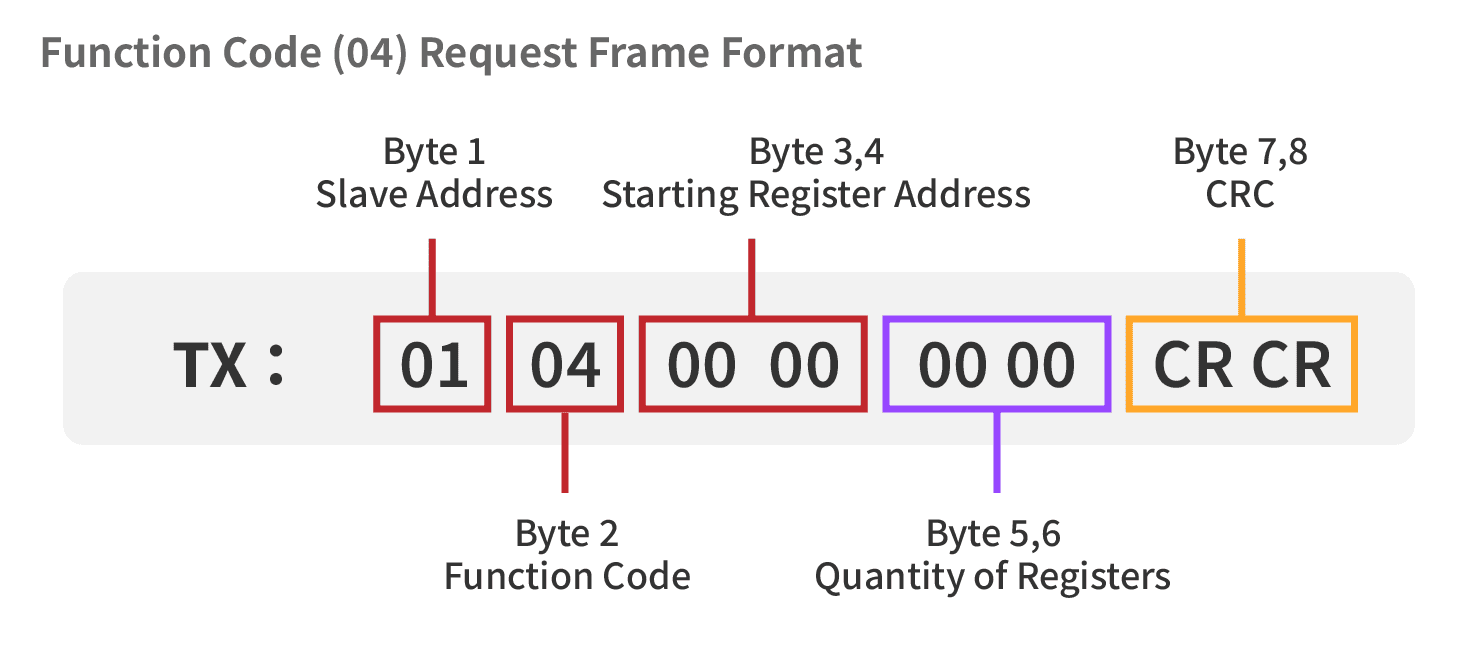
Read-Only Memory – Read Command (04) Format


Modbus RTU Example – Read-Only Memory Read Command (04)
Master Sends Read Command (TX Frame)
According to device specifications, the accumulated flow is stored in Float32 format, occupying 2 registers (4 bytes); therefore, the quantity to read should be set to 00 02. The master must send Modbus function code 04 (Read Input Registers) to read 2 registers starting from address 0000.
Slave Address = 01
Function Code = 04
Starting Register Address = 00 00
Quantity to Read = 00 02 (2 registers)
CRC Checksum = 71 CB
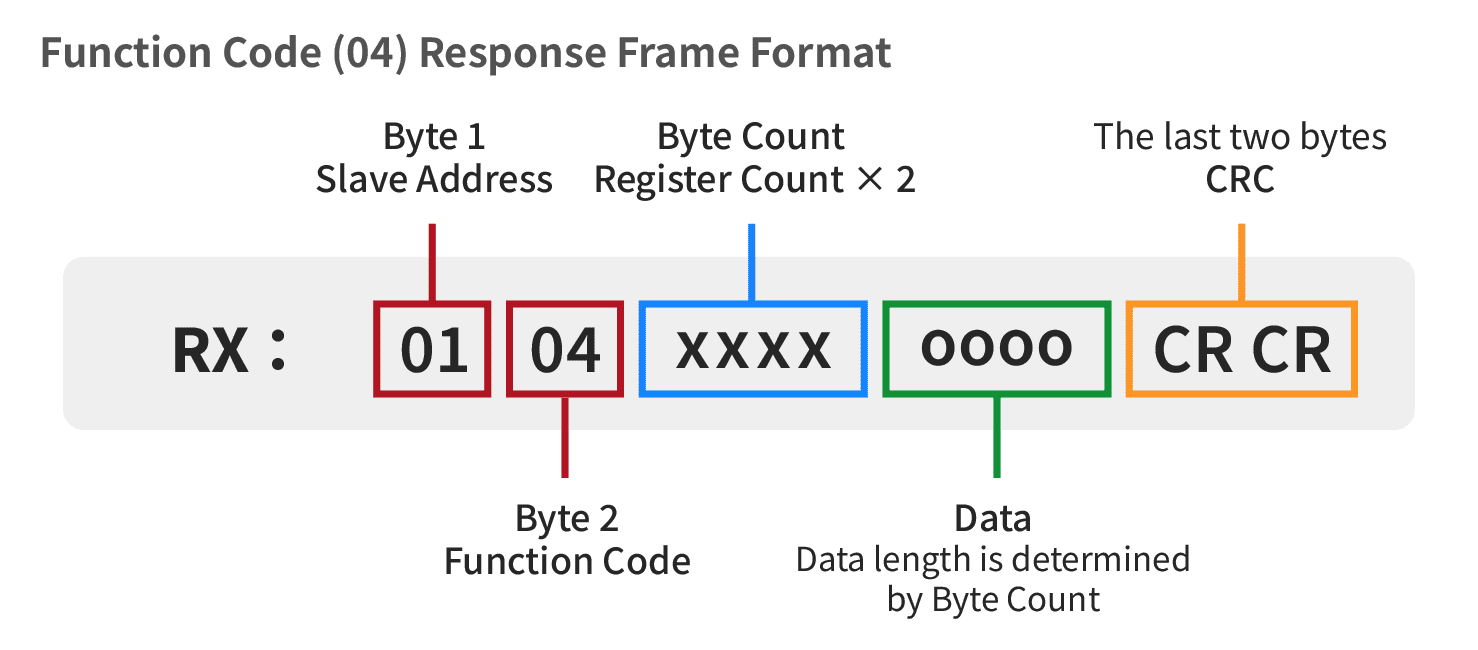
Slave Response Data (RX Frame)
After receiving the read request, the slave returns the internally stored 20,000.5 liters (Float32) data, packaged as 4 bytes according to Modbus Register Big Endian (high byte first) and IEEE 754 Float32 format.
Slave Address = 01
Function Code = 04
Byte Count (Number of Data Bytes) = 04 (4 Bytes)
Data (Data Field) = 45 9C 40 00
CRC Checksum = E2 56
Data Parsing and Conversion (Back to Decimal)
Step A: Arrange the Data
Since the device uses Big Endian format, the most significant byte comes first. Therefore, the 4 bytes are kept in the received order and combined as:
459C4000₁₆
Step B: Decode the Float32 Structure (SEM: S = Sign, E = Exponent, M = Mantissa)
Convert 459C4000₁₆ into a 32-bit binary number for IEEE 754 Float32 interpretation.
Partial Binary Value Explanation
S (Sign bit) = 0 (1 bit) → 0 means a positive number
E (Exponent bits) =
10001011(8 bits) → 139₁₀ Actual exponent = 139 − 127 = 12M (Mantissa bits) =
001110001...(23 bits) → the significand is 1.M
Step C: Calculate the Value
According to the IEEE 754 Float32 format, the calculation is as follows.
The exponent bits 10001011₂ equal 139₁₀, so the actual exponent is 139 − 127 = 12.
The mantissa bits are 0011100100000000000000,, giving a significand of 1.001110001...
After shifting the binary point 12 places to the right and converting to decimal:
Value = 2¹⁴ + 2¹¹ + 2¹⁰ + 2⁹ + 2⁵ + 2⁻¹ = 16384 + 2048 + 1024 + 512 + 32 + 0.5 = 20000.5
Therefore, the Modbus RX response data 01 04 04 45 9C 40 00 E2 56 represents a cumulative flow value of 20000.5 liters.
Modbus Data Format Converter
Below is a sample HTML/CSS/JS (CodePen example) of a simple converter used to convert an 8-digit hexadecimal value into a Float32 number.
Last updated