> For the complete documentation index, see [llms.txt](https://docs.lorric.com/qr/llms.txt). Markdown versions of documentation pages are available by appending `.md` to page URLs; this page is available as [Markdown](https://docs.lorric.com/qr/fu-lt-english-v1/communication/analog-output-4-20ma.md).
# Analog Output 4-20mA
## Specifications
| Wiring | 3-wire |
| -------------------------------------------- | -------------------------------------------------------------------------- |
| Power Supply | Device shares power with the main unit, no external power supply required. |
| Max. Output Range (incl. error signal range) | 2.4 \~ 21.6 mA |
| Resolution | 10-bit (0–24 mA physical range) |
| Response Time | ≤0.5 to 1 s (matches the display update rate) |
| Loop Resistance | 600ohm @ 24VDC |
## Wiring
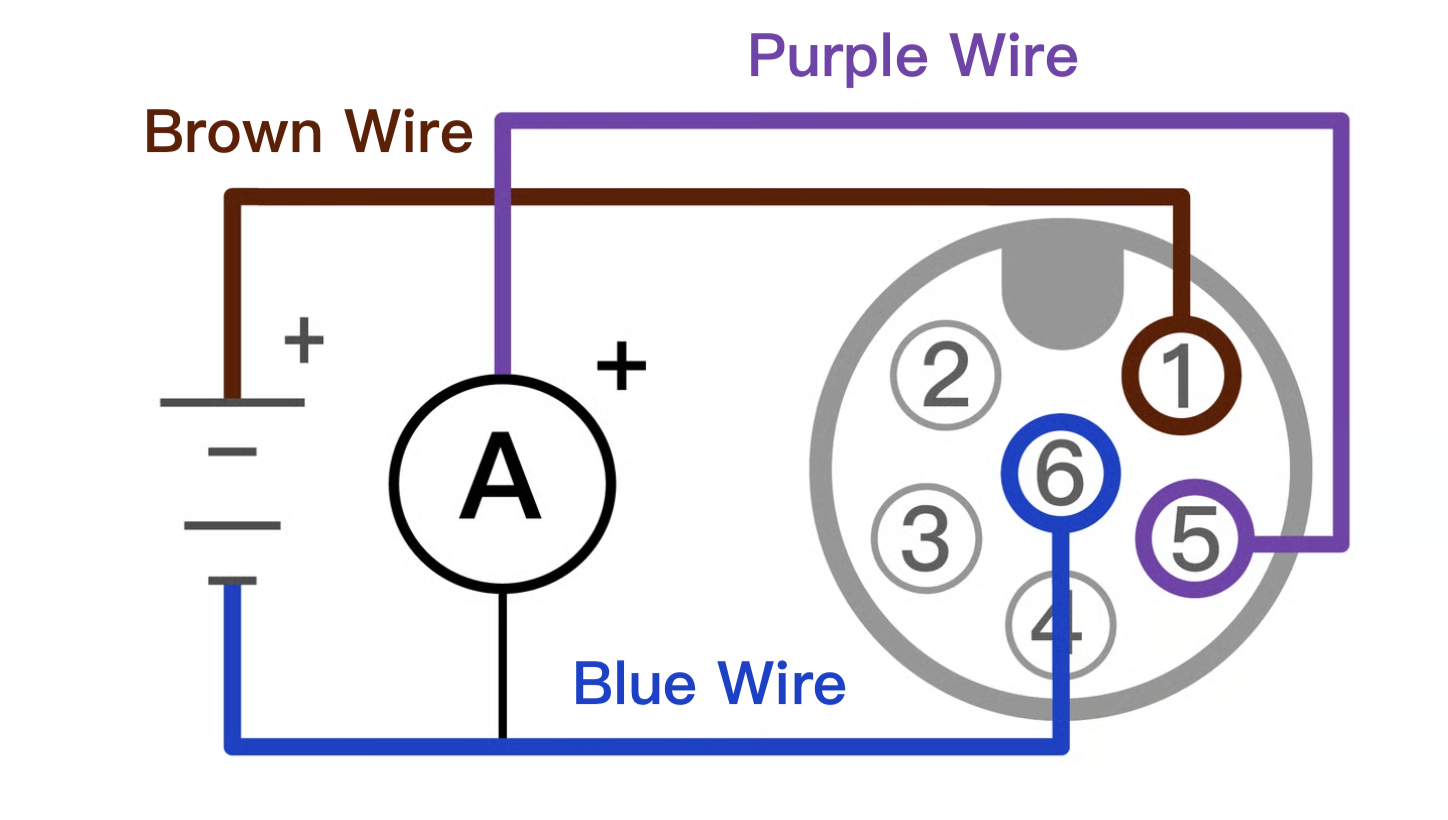
### 4–20 mA Analog Output Wiring Diagram
* **Brown:** 24 VDC (+), **Blue:** 0 VDC (–), **Purple:** 4–20 mA Output (+)
This function requires the brown and blue lines of the main DC power supply to be powered.
### Analog Output 4-20mA Parameter Configuration
Follow the steps below to configure analog output parameters:
{% stepper %}
{% step %}
#### **Set Basic Parameters**
* Refer to the [**Parameter Settings**](/qr/fu-lt-english-v1/installation-and-setup/parameter-settings.md) page and complete the following steps: **Language Setting, Pipe Settings:A02:** Pipe Standard, **A04:** Pipe Outer Diameter, **A06:** Pipe Wall Thickness, **A08:** Pipe Material
* Execute **Z03 (Automatic Initialization)**.
{% endstep %}
{% step %}
#### **Wiring Setup**
Connect the 4–20 mA analog output wiring according to the instructions on this page.
{% endstep %}
{% step %}
#### **E06 Analog Output Content (Select Output Data Type)**
Set parameter **E06 Iout Def.** to enable the analog current output and select the data to be output. Available options: **“Cumulative Total”**, **“Flow Rate”**, or **“Flow”**.
{% endstep %}
{% step %}
#### **E13 – Analog Output Range (Set Current Range)**
Use parameter **E13 Iout Range** to set the current output range to **4–20 mA**.
{% endstep %}
{% step %}
#### E07 – 4 mA Value / E08 – 20 mA Value (Set Output Minimum and Maximum)
Set parameters **E07 4mA Value** and **E08 20mA Value** to define the output minimum and maximum. Negative values are allowed. **Note:** E07 must be less than E08.
* **Example:** To map 4–20 mA to a range of **−10 to +20**:
* Set **E07 (4 mA Value)** to **−10**
* Set **E08 (20 mA Value)** to **+20**
Intermediate values are calculated linearly: 12 mA ≈ **+5,** 16 mA ≈ **+15**
{% endstep %}
{% step %}
#### E09 **Analog Error Value (Set Output for Out-of-Range Flow)**
Use parameter **E09 Iout Error** to specify the current output when the flow value exceeds the range defined by **E07** and **E08**.
* Example: **E09 mode:** 2.4 mA & 21.6 mA, **E07:** −10, **E08:** +20
* Flow < E07 (−10) → output **2.4 mA**
* Flow > E08 (+20) → output **21.6 mA**
{% endstep %}
{% step %}
#### E11 4 mA Fine Adjustment (µA) (Adjust 4 mA Output)
Enter **E11 4mA Fine Adj. µA** to test and adjust the 4 mA output. Each increment or decrement of 1 changes the output current by 1 µA.
* If an external ammeter measures 3.95 mA, which is 0.05 mA (50 µA) below the target of 4.00 mA,
* Set E11 to +50. The output will then be corrected to 4.00 mA.
{% endstep %}
{% step %}
#### E12 20 mA Fine Adjustment (µA) (Adjust 20 mA Output)
Enter **E12 20mA Fine Adj. µA** to test and adjust the 20 mA output. Each increment or decrement of 1 changes the output current by **1 µA**.
* If an external ammeter measures **19.95 mA**, which is **0.05 mA (50 µA)** below the target of **20.00 mA**, set **E12** to **+50**. The output will then be corrected to **20.00 mA**.
* If the 20 mA output cannot reach the target after adjusting **E12**, this may be due to excessive loop impedance or insufficient voltage. Check the **4–20 mA specifications** on the Motor Installation page and adjust the loop impedance or increase the voltage as necessary.
{% endstep %}
{% endstepper %}
{% hint style="info" %}
After completing the 4–20 mA settings, verify the configuration using **Simulation Mode** to ensure correctness.
{% endhint %}
---
# Agent Instructions
This documentation is published with GitBook. GitBook is the documentation platform designed so that both humans and AI agents can read, navigate, and reason over technical content effectively. Learn more at gitbook.com.
## Querying This Documentation
If you need additional information that is not directly available in this page, you can query the documentation by asking a question.
Perform an HTTP GET request on the following URL with the `ask` and `goal` query parameters:
```
GET https://docs.lorric.com/qr/fu-lt-english-v1/communication/analog-output-4-20ma.md?ask=&goal=
```
`ask` is the immediate question: it should be specific, self-contained, and written in natural language.
`goal` is what the user is ultimately trying to achieve, the reason they need the answer. Sharing it helps GitBook give you a better, more relevant answer. A goal is most helpful when it describes the outcome the user wants rather than restating the question. For example, with `ask=how do I create an API token`, a goal like `automate deployments from our CI pipeline` lets GitBook tailor the answer to that use case.
The response will contain a direct answer to the question and relevant excerpts and sources from the documentation.
Use this mechanism when the answer is not explicitly present in the current page, you need clarification or additional context, or you want to retrieve related documentation sections.