# RS485 與 Modbus RTU 設定

{% hint style="info" %}
RS485 通訊僅在「主畫面」狀態下才會啟用。\
當設備停留在設定畫面或參數編輯畫面時，RS485 將不回應任何 Modbus 指令。
{% endhint %}

## 規格

| 鮑率 Baud    | 9600, 19200, 38400, 57600      |
| ---------- | ------------------------------ |
| 接線         | 二線式                            |
| 同一網絡中最多節點數 | 32 台（標準單位負載條件下，每台裝置計為 1 個單位負載） |

## 接線

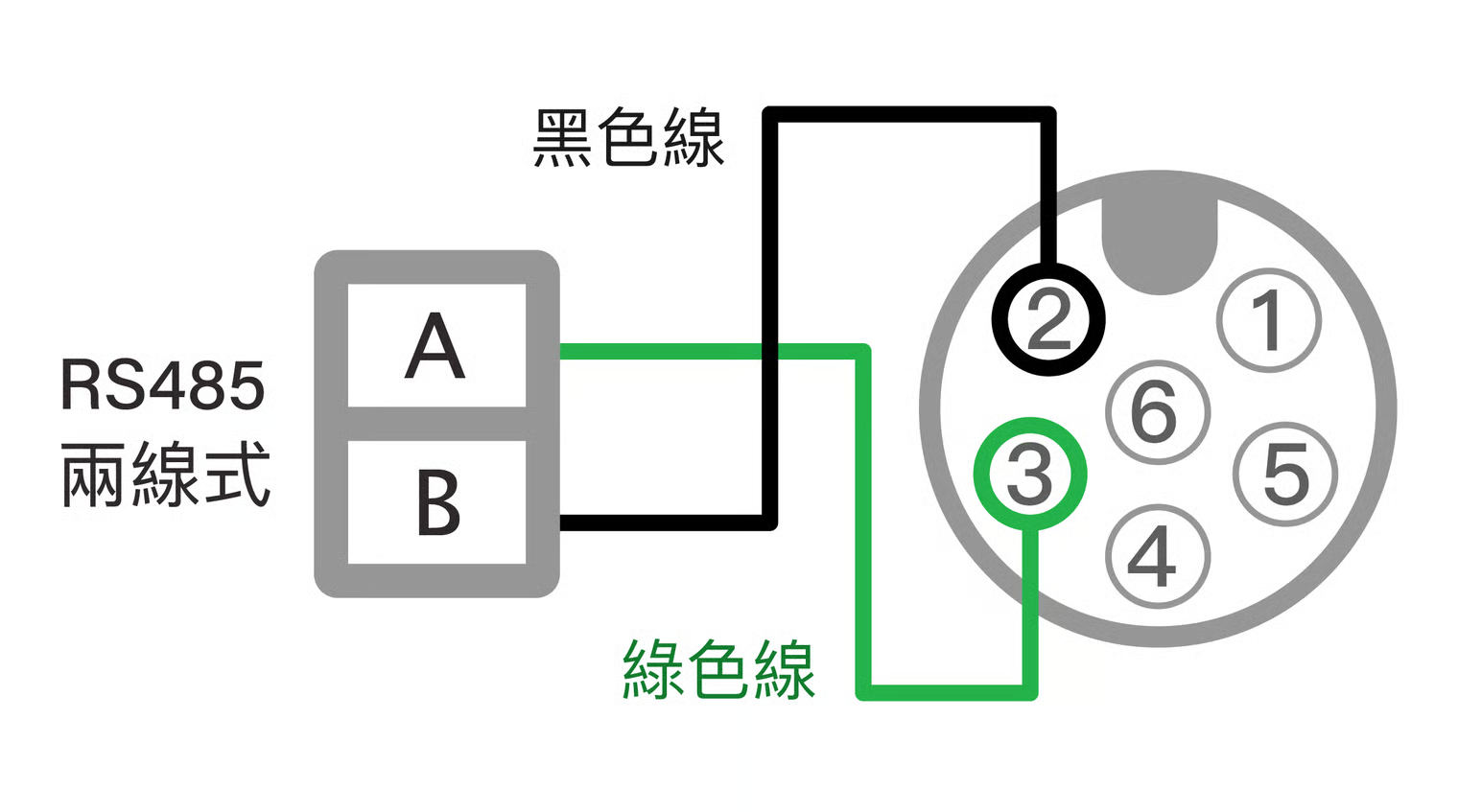
### RS485 二線式配線圖

黑色線：RS485 (B-)、綠色線：RS485 (A+)

本功能必需在DC 電源的棕藍色有供電的情形下，才能工作。為維持圖面易讀性，本圖省略DC供電圖，詳情形見DC 電源配線圖。

{% hint style="danger" %}
請注意RS485的配線請勿和電源配線接錯，若因誤接導致線路或產品受損，請聯繫 LORRIC 原廠安排機器更換，相關維修費用需由使用者承擔。
{% endhint %}

<figure><img src="/files/gkLSN9rjnV5EKqAEdKdu" alt=""><figcaption></figcaption></figure>

{% hint style="info" %}

### 配線建議

1. 一般建議使用帶屏敝 24awg 雙絞線，以串接方式連線每台設備，不要使用環狀或放射狀線路。
2. 連線長時，請在 master 及線路最遠端使用終端電阻，終端電阻業界常使用 120Ω，實際數值請參照線材規格計算。
3. 若通訊訊號不穩定，可於總線上的適當位置（通常靠近主站）加裝偏壓電阻，以提升訊號穩定性。。&#x20;
4. 隨貨6蕊線，如果使用在 RS485 通訊，請修剪線材長度，盡量使用最短必要線長，以降低雜訊干擾。並將隔離網與主要通訊線屏敝相連後接地。
5. 在訊號干擾多的地方，軟體可能需要多次詢問才能得到回應，請在通訊程式內建立多次詢問機制，以區別訊號干擾與設備異常離線兩種情形。
   {% endhint %}

## RS485 Modbus RTU參數設定

{% stepper %}
{% step %}

### 設定基本參數

請參考[參數設定](/qr/fu-lt-ultrasonic-flowmeter-manual-chinese-v1/installation-and-setup/parameter-setup.md)頁面，完成參數設定步驟：語言設定，管路設定A02 (管規), A04(管路外徑) , A06 (管路厚度), A08 (管路材質) 設定。

執行Z03 (自動上機初始化)。
{% endstep %}

{% step %}

### 設置接線

依照本頁指示將RS485 Modbus RTU配線設置妥當。
{% endstep %}

{% step %}

### E04 Modbus ID 應用傳輸協定

請設定 **E04** 以指定流量計於 **RS485 / Modbus** 網路中的從站位址（Modbus Slave ID）。請確認同一通訊線路上各設備之位址皆為唯一，避免地址重複造成通訊衝突。

本參數不支援使用 RS485 修改。
{% endstep %}

{% step %}

### E05 Baud 鮑率

請設定 **E05 Baud 鮑率** 以指定流量計之 **Modbus 通訊速率（Baud Rate）**。\
主站（Master）與流量計（Slave）必須設定為**完全相同的鮑率**，方可建立正常通訊。

本參數不支援使用 RS485 修改。
{% endstep %}

{% step %}

### 返回到主畫面

請回到主畫面（綠燈），必需在主畫面下，RS485 才會工作。
{% endstep %}

{% step %}

### 測試要讀寫的記憶體

請參考 [Modbus RTU Protocol](/qr/fu-lt-ultrasonic-flowmeter-manual-chinese-v1/communication/modbus-rtu-protocol.md) 測試要讀寫的記憶體。

<table><thead><tr><th width="124.26953125"></th><th></th></tr></thead><tbody><tr><td>通訊格式</td><td><p>bit order: lsb first</p><p>byte order: big endian</p><p>Data bits:8 </p><p>Parity: None </p><p>Stop bits: 1</p><p>Floating point number follows IEEE754-1985. The float32 below stands for 32bits Single precision floating point number.</p></td></tr><tr><td>記憶體定義及功能</td><td><p>modbus 可操作的記憶體分為兩大類，唯讀型及讀寫型。</p><p>唯讀型主要是流量計狀態相關的記憶體，例如即時流量。這部分也是最常使用的記憶體。唯讀型的記憶體只能使用指 04 來讀取。</p><p>讀寫型主要是流量計設定參數記憶體，寫入操作一次只能改變一個參數，如果目標參數的記憶體長度是 1個 register，使用指令 06，如果目標參數的記憶體長度是 2 register，使用 30。</p></td></tr></tbody></table>

{% hint style="info" %}
在 Modbus RTU 通訊中，Register（暫存器）是記憶體通訊的基本單位，其長度為 **2 Byte（16 bit）**；而 Byte（位元組）則是資料傳輸的基本單位，長度為 **8 bit**。
{% endhint %}
{% endstep %}
{% endstepper %}

## Modbus RTU 讀取 Float32 數據範例

以唯讀型記憶體讀取指令（04）為例，說明在累積流量為 **20000.5 公升**時，應如何發送指令並將回傳的資料解析為十進位數值。

### 唯讀型記憶體-讀取指令(04)格式 <a href="#kong-zhi-duan-fa-zhi-ling-04-ge-shi" id="kong-zhi-duan-fa-zhi-ling-04-ge-shi"></a>

<div align="left"><figure><img src="/files/5hlV3zhIwfOg7hIleHtK" alt="" width="563"><figcaption></figcaption></figure></div>

<div align="left"><figure><img src="/files/I40u3cx76yK2GCgmTXAP" alt="" width="563"><figcaption></figcaption></figure></div>

### Modbus RTU 讀取唯讀型記憶體讀取指令 (04) 範例

#### **主站發送讀取指令 (TX 訊框)**

根據設備規格，累積流量採 Float32 格式，佔用 2 個暫存器（共 4 bytes），因此讀取數量需設定為 00 02。主站需發送 Modbus 功能碼 04（讀取輸入暫存器），以讀取從位址 `0000` 開始的 2 個暫存器數據。

```
TX 請求指令： 01 04 00 00 00 02 71 CB
```

* Slave Address = 01
* Function Code = 04
* 起始暫存器位址 = 00 00
* 讀取數量 = 00 02 (2 個暫存器)
* CRC 校驗碼 = 71 CB

#### **從站回覆數據 (RX 訊框)**

從站收到讀取請求後，將內部儲存的 20000.5 升（Float32）數據，依 Modbus Register Big Endian（高位元組在前） 與 IEEE 754 Float32 格式，封裝為 4 個位元組回傳。

```
RX 回覆數據： 01 04 04 45 9C 40 00 E2 56
```

* Slave Address = 01
* Function Code = 04
* Byte Count（資料位元組數）= 04 (4 Bytes)
* Data（資料欄位） = 45 9C 40 00
* CRC 校驗碼 = E2 56&#x20;

#### **數據解析與轉換 (轉回十進制)**

步驟 A：排列數據

由於設定為 大端模式 (Big Endian)，資料的最高位元組放在最前面，因此 4 個位元組的順序就是收到的順序：

<p align="center">459C4000 ₁₆</p>

步驟 B：拆解 Float32 結構 (SEM: S-符號位, E-指數位, M-尾數位)

將 459C4000 ₁₆ 轉換為32位二進位制

<figure><img src="/files/8ySnB8zkS4PFgJF3enOj" alt=""><figcaption></figcaption></figure>

<table data-header-hidden><thead><tr><th width="112.7470703125"></th><th width="140.84765625"></th><th width="115.1005859375"></th><th></th></tr></thead><tbody><tr><td>部分</td><td>二進制數值</td><td>位元數</td><td>說明</td></tr><tr><td>S (符號位)</td><td>0</td><td>1 bit</td><td>0=正數</td></tr><tr><td>E (指數位)</td><td>10001011</td><td>8 bits</td><td><p>139₁₀。 實際指數：</p><p>139 - 127 (Float 32 偏移量) = 12</p></td></tr><tr><td>M (尾數位)</td><td>001110001...</td><td>23 bits</td><td>有效數字 1.M </td></tr></tbody></table>

#### 步驟 C：計算數值

根據 IEEE 754 公式：

<div align="left"><figure><img src="/files/Q16sifGqCRTy3nJKo1gA" alt="" width="352"><figcaption></figcaption></figure></div>

• 指數位：E = 10001011 轉換為10 進位制

```
10001011₂ 
= (1 x 2⁷) + (0 x 2⁶) + (0 x 2⁵) +  (0 x 2⁴)
  + (1 x 2³) +  (0 x 2²) +  (1 x 2¹) +  (1 x 2⁰) 
= 128 + 0 + 0 + 0 + 8 + 0 + 2 + 1 
= 139₁₀
```

在 IEEE 754 Float32 標準中，指數位採用偏移表示法表示正指數和負指數，標準規定的偏移量 (Bias) 是 127，因此實際指數是 139 - 127 = 12

• 尾數部分：M=0011100100000000000000

&#x20;  有效數字 1.M：1.001110001 (後面的零可以忽略)

•  得根據 IEEE754 浮點數數值表示為

$$
(-1)⁰  ×  1.001110001 × 2¹²
$$

將小數點向右移動 12 位：

<div align="left"><figure><img src="/files/bBD0ncvyPGGJKcO0ydET" alt="" width="375"><figcaption></figcaption></figure></div>

•  將這個二進制數轉換回十進制：

```
數值 = 2¹⁴+2¹¹+2¹⁰+2⁹+2⁵+2⁻¹
    = 16384 + 2048 + 1024 + 512 + 32 + 0.5
    = 20000.5
```

得請求<mark style="background-color:red;">累積流量，RX 回覆數據： 01 04 04 45 9C 40 00 E2 56  值為 20000.5 升</mark>

### Modbus 不同格式間的轉換器

{% embed url="<https://codepen.io/philo_lorric/pen/BagqoRj>" %}


---

# Agent Instructions: Querying This Documentation

If you need additional information that is not directly available in this page, you can query the documentation dynamically by asking a question.

Perform an HTTP GET request on the current page URL with the `ask` query parameter:

```
GET https://docs.lorric.com/qr/fu-lt-ultrasonic-flowmeter-manual-chinese-v1/communication/rs485-setup.md?ask=<question>
```

The question should be specific, self-contained, and written in natural language.
The response will contain a direct answer to the question and relevant excerpts and sources from the documentation.

Use this mechanism when the answer is not explicitly present in the current page, you need clarification or additional context, or you want to retrieve related documentation sections.
