> For the complete documentation index, see [llms.txt](https://docs.lorric.com/qr/llms.txt). Markdown versions of documentation pages are available by appending `.md` to page URLs; this page is available as [Markdown](https://docs.lorric.com/qr/fu-lt-english-v1/parameters/a-measurement-setup/a23-zero-offset.md).
# A23 Zero Offset
### Definition
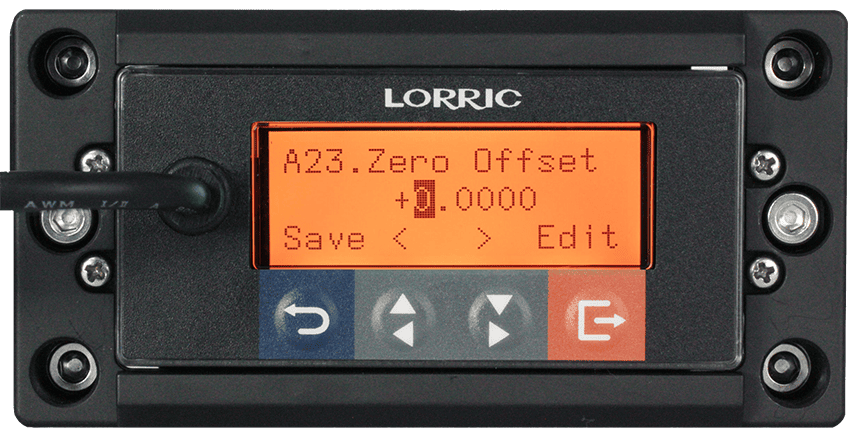
This function performs **manual zero-point compensation** to correct internal system timing offsets. The setting unit is **ns (nanoseconds)**, not a flow unit.
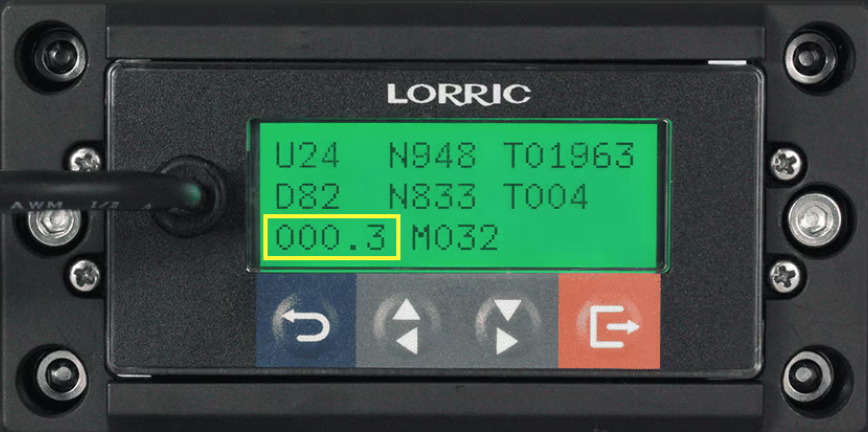
To configure, refer to the value displayed at the **bottom-left of the main screen User Debug Page**, and enter that value into **A23**.
**User Debug Page**
1. Make sure **H10 Debug Page** is turned on.
2. Return to the main screen and use the arrow keys to navigate to the **User Debug Page**.
3. Observe the value in the bottom-left (highlighted in yellow). The value may fluctuate slightly; it is recommended to observe for a while and enter the **average value** into **A23**.
Debug Screen(actual values may vary depending on conditions)
### Notes
N/A
### Operation Procedure
Button Functions(Click to Expand)
The main unit has **four buttons**. The **bottom line (Line 3)** of the LCD displays the current function of each button. Under normal operation, the button functions are as follows:
* **Blue Button -** Leftmost button: Return, exit, or save settings.
Gray Arrow Buttons:
* **Left Gray Button:** Previous Page, decrease value, or select item
* **Right Gray Button:** Next Page, increase value, or select item
* **Orange Button:** Rightmost button: Enter settings, edit, or confirm selection
{% hint style="danger" %}
**Do not hold buttons for extended periods to avoid damage.**
{% endhint %}
{% hint style="info" %}
Button functions may change depending on the operation context to improve usability or prevent accidental presses.
{% endhint %}
```
A23 Zero Offset Setting Steps
• From the main screen(green backlight),
press Orange Button(Setup) to enter settings (orange backlight).
• Use Gray Arrow Buttons to select A. Measurement, press Orange Button(Enter).
• Use Gray Arrow Buttons to select A23 Zero Offset, press Orange Button(Enter).
• Use Gray Arrow Buttons to choose the digit to adjust(highlighted in dark gray).
• Press Orange Button(Edit) to enter adjustment mode.
• Adjust digits: Left Gray Button to increase, Right Gray Button to decrease.
• Press Orange Button(Set) to confirm each digit; repeat for other digits as needed.
• After all digits are set, press Blue Button(Save).
Confirm by pressing Orange Button(Save) (or Blue Button(NOT) to cancel).
• Press Blue Button(ESC) to return to the main screen(green backlight).
```
### A23 Options, RS485 Values, Read/Write Commands, and Formats
| Input Range of This Parameter | Corresponding Values | RS-485 Value |
| ----------------------------- | -------------------- | ------------- |
| Default | 0 | - |
| Minimum | -100 | - |
| Maximum | 100 | - |
---
# Agent Instructions
This documentation is published with GitBook. GitBook is the documentation platform designed so that both humans and AI agents can read, navigate, and reason over technical content effectively. Learn more at gitbook.com.
## Querying This Documentation
If you need additional information that is not directly available in this page, you can query the documentation by asking a question.
Perform an HTTP GET request on the following URL with the `ask` and `goal` query parameters:
```
GET https://docs.lorric.com/qr/fu-lt-english-v1/parameters/a-measurement-setup/a23-zero-offset.md?ask=&goal=
```
`ask` is the immediate question: it should be specific, self-contained, and written in natural language.
`goal` is what the user is ultimately trying to achieve, the reason they need the answer. Sharing it helps GitBook give you a better, more relevant answer. A goal is most helpful when it describes the outcome the user wants rather than restating the question. For example, with `ask=how do I create an API token`, a goal like `automate deployments from our CI pipeline` lets GitBook tailor the answer to that use case.
The response will contain a direct answer to the question and relevant excerpts and sources from the documentation.
Use this mechanism when the answer is not explicitly present in the current page, you need clarification or additional context, or you want to retrieve related documentation sections.