> For the complete documentation index, see [llms.txt](https://docs.lorric.com/qr/llms.txt). Markdown versions of documentation pages are available by appending `.md` to page URLs; this page is available as [Markdown](https://docs.lorric.com/qr/fu-lt-english-v1/installation-and-setup/electrical-installation.md).
# Electrical Installation
{% hint style="danger" %}
**Safety First:** Do not perform wiring while the unit is powered on. Before any wiring work, turn off the power and disconnect the power supply.
{% endhint %}
{% hint style="danger" %}
**CRITICAL WARNING**: **Do not apply overvoltage to communication lines**\
The Modbus RS-485 communication lines (A/B) have a maximum rated voltage of typically 5 V. They must never be connected to or share continuity with the flowmeter's DC 24 V power lines. Incorrect wiring will instantly destroy the internal core components of the flowmeter. Damage caused by wiring errors is not covered under warranty. Always verify all wiring with a multimeter before powering on the device.
{% endhint %}
## **6-Pin Quick Connector Pin Definition**
* Connect the supplied cable to the power supply and the required communication interfaces. Unused wires must be insulated with protective material to prevent electric leakage or short circuits.
* Before opening the unit or performing any wiring, turn off the power and disconnect the power supply.
* Due to space limitations, the label on the side of the unit and the following diagrams show **wire pin definitions only**.
The 6-pin quick connector wire color assignments are defined as follows:

| | |
|---|
| 1 | Brown | 24 VDC (+) |
| 2 | Black | RS485 (B-) |
| 3 | Green | RS485 (A+) |
| 4 | Orange | NPN output (+) |
| 5 | Purple | 4~20mA (+) |
| 6 | Blue | 0 VDC (-) |
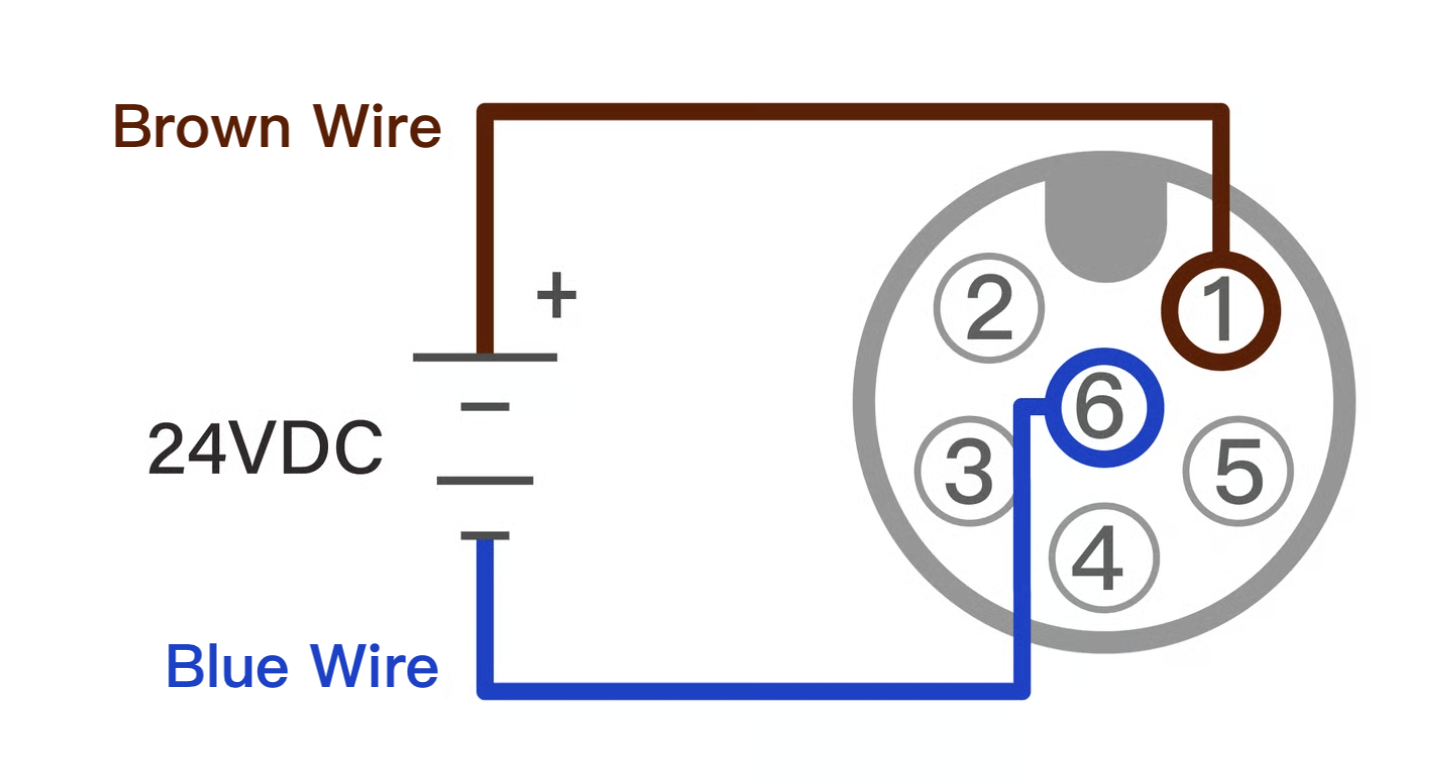
### 24V DC Power Wiring Diagram
* **Brown wire**: 24 VDC (+)
* **Blue wire**: 0 VDC (–)
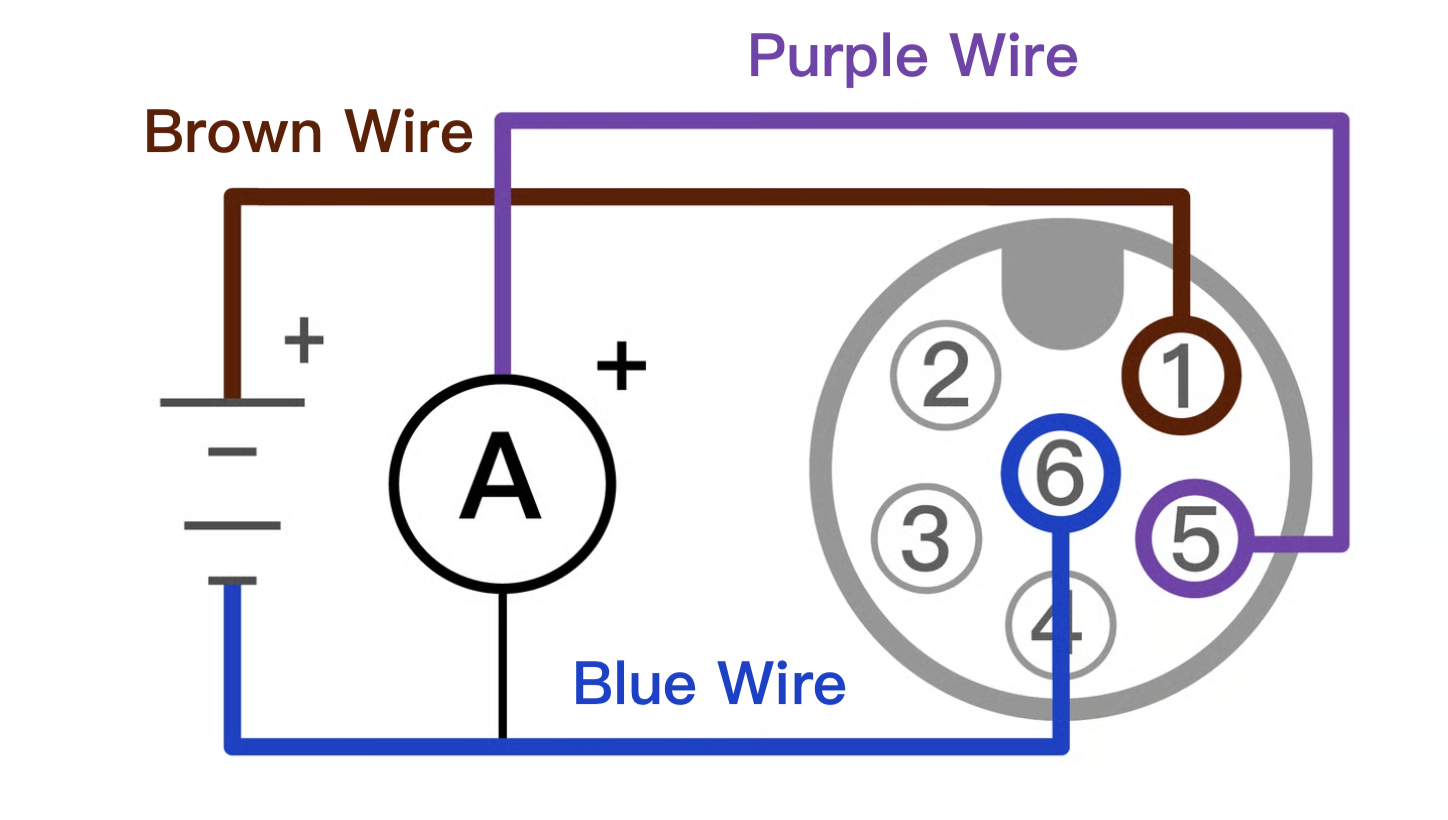
### 4–20 mA Analog Output Wiring Diagram
* **Brown wire**: 24 VDC (+)
* **Blue wire**: 0 VDC (–)
* **Purple wire**: 4–20 mA (+)
### **NPN Output Wiring Diagram**
* **Brown wire**: 24 VDC (+)
* **Blue wire**: 0 VDC (–)
* **Orange wire**: NPN Output (+)
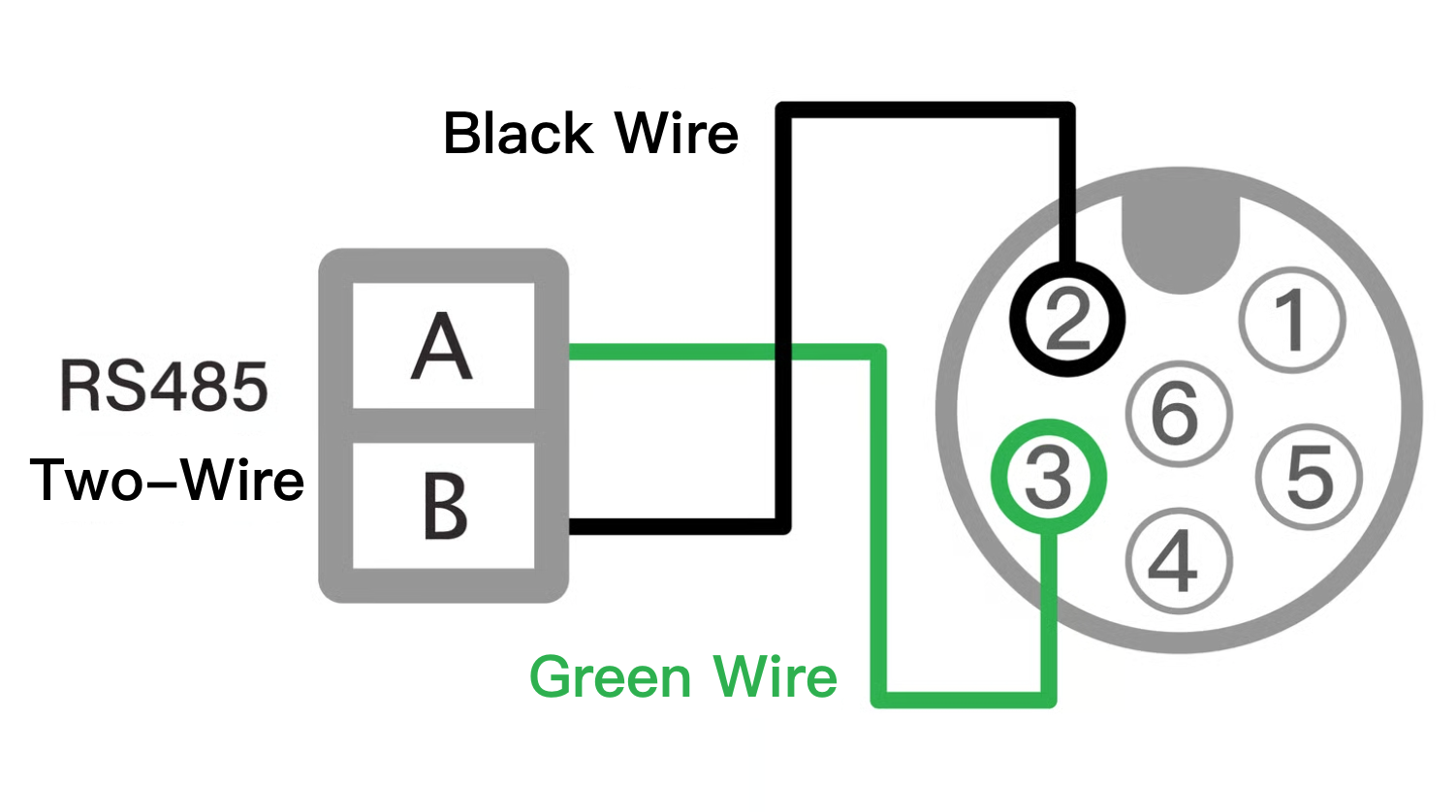
### **RS-485 Two-Wire Wiring Diagram**
* **Black wire**: RS-485 B (–)
* **Green wire**: RS-485 A (+)
{% hint style="info" %}
#### RS-485 Wiring Recommendations
* It is recommended to use **shielded 24 AWG twisted-pair cable** and connect devices in a **daisy-chain configuration**. Do not use star or ring wiring.
* For long cable runs, install **termination resistors** at both the master and the farthest device. A typical value is **120 Ω**, but the actual value should be calculated based on the cable specifications.
* If signal instability occurs, consider adding **bias resistors** at a point along the line.
* For the supplied 6-core cable, when used for RS-485 communication, **trim excess length** to minimize noise interference. Connect the shield braid to the main communication wires and **ground it**.
* In areas with heavy signal interference, the software may need to **poll multiple times** to receive a response. Implement a **repeated polling mechanism** in the communication program to distinguish between signal interference and actual device offline conditions.
{% endhint %}
***
---
# Agent Instructions
This documentation is published with GitBook. GitBook is the documentation platform designed so that both humans and AI agents can read, navigate, and reason over technical content effectively. Learn more at gitbook.com.
## Querying This Documentation
If you need additional information that is not directly available in this page, you can query the documentation by asking a question.
Perform an HTTP GET request on the following URL with the `ask` and `goal` query parameters:
```
GET https://docs.lorric.com/qr/fu-lt-english-v1/installation-and-setup/electrical-installation.md?ask=&goal=
```
`ask` is the immediate question: it should be specific, self-contained, and written in natural language.
`goal` is what the user is ultimately trying to achieve, the reason they need the answer. Sharing it helps GitBook give you a better, more relevant answer. A goal is most helpful when it describes the outcome the user wants rather than restating the question. For example, with `ask=how do I create an API token`, a goal like `automate deployments from our CI pipeline` lets GitBook tailor the answer to that use case.
The response will contain a direct answer to the question and relevant excerpts and sources from the documentation.
Use this mechanism when the answer is not explicitly present in the current page, you need clarification or additional context, or you want to retrieve related documentation sections.