> For the complete documentation index, see [llms.txt](https://docs.lorric.com/qr/llms.txt). Markdown versions of documentation pages are available by appending `.md` to page URLs; this page is available as [Markdown](https://docs.lorric.com/qr/fu-es-echosense-instruction-manual/user-interface/monitor-page-explanation.md).
# Main Screen
Table of Contents
[#screen-1-flowrate](#screen-1-flowrate "mention")
[#screen-2-hybrid1](#screen-2-hybrid1 "mention")
[#screen-3-status-page](#screen-3-status-page "mention")
[#screen-4-dosing](#screen-4-dosing "mention")
[#id-5-total-less-than-large-greater-than](#id-5-total-less-than-large-greater-than "mention")
[#screen-6-velocity](#screen-6-velocity "mention")
[#screen-7-flowrate-less-than-large-greater-than](#screen-7-flowrate-less-than-large-greater-than "mention")
[#screen-8-total](#screen-8-total "mention")
[#screen-9-velocity](#screen-9-velocity "mention")
[#debug-screens](#debug-screens "mention")
[#h09-home-page-setting](#h09-home-page-setting "mention")
The FU-ES features **nine main screens**. The **H09 Home Page** function lets you select which screen is displayed at startup. [Detailed H09 instructions](#h09-home-page-setting) are provided at the end of this section.\
Two debug screens are also available when [H10](/qr/fu-es-echosense-instruction-manual/parameters/h-system/h10-debug-page.md) is enabled.
The FU-ES display consists of an upper **LED display** and a lower **LCD display**. The LED display shows real-time flow data (up to five digits). The LCD display changes content according to the main screen selected.
When the main screen is displayed in **green backlight**, the four buttons function as follows:
* **Blue Button:** Leftmost button: Return, exit, or save settings.
* Gray Direction Buttons:
* **Left Gray:** Previous page, decrease a value, or select an item.
* **Right Gray:** Next page, increase a value, or select an item.
* **Orange Button (rightmost):** Enter settings, edit, or confirm selection.
## Main Screen Menu
### Screen 1: Flowrate
Displays instant flowrate.\
The LED display shows data up to five digits. The first line of the LCD shows the flow unit **(L/m)**, the second line shows **Instant Flowrate**, and the third line shows the flow signal on the lower left and **Setup** on the lower right. Press the orange button to open the **Settings screen**.
{% hint style="info" %}
A single-bar signal indicates a poor measurement environment. A reading below one bar may be caused by air bubbles or other interference. When the signal drops below one bar, **Noisy** is typically displayed. Adjust the pipe according to the installation instructions to improve the signal.
{% endhint %}
### Screen 2: Velocity
Displays flow velocity.\
The LED display shows data up to five digits. The first line of the LCD shows the velocity unit (**m/s**), the second line displays **Velocity**, and the third line shows the flow signal on the lower left and **Setup** on the lower right. Press the orange button to open the **Settings screen**.
Velocity units can be adjusted in [B04 Velocity Unit](/qr/fu-es-echosense-instruction-manual/parameters/b-unit/b04-velocityunit.md).
### Screen 3: Total
Displays total accumulated flow.\
The LED display shows data up to five digits. The first line of the LCD shows the total flow unit (**L**), the second line displays **Total Flow**, and the third line shows the flow signal on the lower left and **Setup** on the lower right. Press the orange button to open the **Settings screen**.
Total flow units can be adjusted in [B03 Total Unit](/qr/fu-es-echosense-instruction-manual/parameters/b-unit/b03-total-unit.md).
{% hint style="info" %}
Flow in Simulation Mode is also included in the total flow.
{% endhint %}
### Screen 4: Flowrate \
Displays instant flowrate with enlarged digits for easy viewing.\
The LED display shows data up to five digits. The large LCD digits show the flowrate, and the lower right displays the unit (**L/m**). Pressing the orange button at the lower right opens the **Settings screen**.
Flow units can be adjusted in [B01 Vol. Unit](/qr/fu-es-echosense-instruction-manual/parameters/b-unit/b01-vol.unit.md) and [B02 Time Unit](/qr/fu-es-echosense-instruction-manual/parameters/b-unit/b02-time-unit.md).
### Screen 5: Velocity \
Displays flow velocity with enlarged digits for easy viewing.\
The LED display shows data up to five digits. The large LCD digits show the velocity, and the lower right displays the unit (**m/s**). Pressing the orange button at the lower right opens the **Settings screen**.
Velocity units can be adjusted in [B04 Velocity Unit](/qr/fu-es-echosense-instruction-manual/parameters/b-unit/b04-velocityunit.md).
### Screen 6: Total \
Displays total flow with enlarged digits for easy viewing.\
The LED display shows data up to five digits. The large LCD digits show **Total Flow**. **POS** at the bottom indicates forward direction, and the lower right shows the flow unit (**L**). Pressing the orange button at the lower right opens the **Settings screen**.
The total calculation method can be adjusted in [C01 Total Method](/qr/fu-es-echosense-instruction-manual/parameters/c-total/c01-total-method.md): **POS** (Forward), **NET** (Net), or **NEG** (Reverse). Total flow units can be adjusted in [B03 Total Unit](/qr/fu-es-echosense-instruction-manual/parameters/b-unit/b03-total-unit.md).
{% hint style="info" %}
Flow in Simulation Mode is also included in the total accumulated flow.
{% endhint %}
### Screen 7: Dosing
Used for batch or quantitative control (**Dosing**).\
The LED display shows data up to five digits. The first line of the LCD shows the **Dosing Reset Time**, the second line shows **Total Flow**, and the third line shows the flow signal on the lower left and **Setup** on the lower right. Press the orange button to open the **Settings screen**.
The dosing reset time can be adjusted in [C05 Dosing Reset Time](/qr/fu-es-echosense-instruction-manual/parameters/c-total/c05-dosing-reset-time.md), and total flow units can be adjusted in [B03 Total Unit](/qr/fu-es-echosense-instruction-manual/parameters/b-unit/b03-total-unit.md).
### Screen 8: Status Page
Displays system status and diagnostics, including **Alarm A, B, and C codes** and the system **S code**.\
A red flowmeter indicator signals a problem that requires attention. Switch to this screen to confirm flowmeter abnormalities. For details, refer to the [Alarms and System Status](/qr/fu-es-echosense-instruction-manual/user-interface/alarms-and-system-status.md) section.
{% hint style="info" %}
Record a video or take a photo of this page for factory verification if an issue occurs.
{% endhint %}
### Debug Screens
Two additional debug screens are available when [**H10**](/qr/fu-es-echosense-instruction-manual/parameters/h-system/h10-debug-page.md) is enabled. These screens are intended for diagnostics and factory troubleshooting.
{% hint style="info" %}
If a problem occurs, record a video or take a photo of these screens for factory confirmation.
{% endhint %}
### Screen 9: Hybrid1
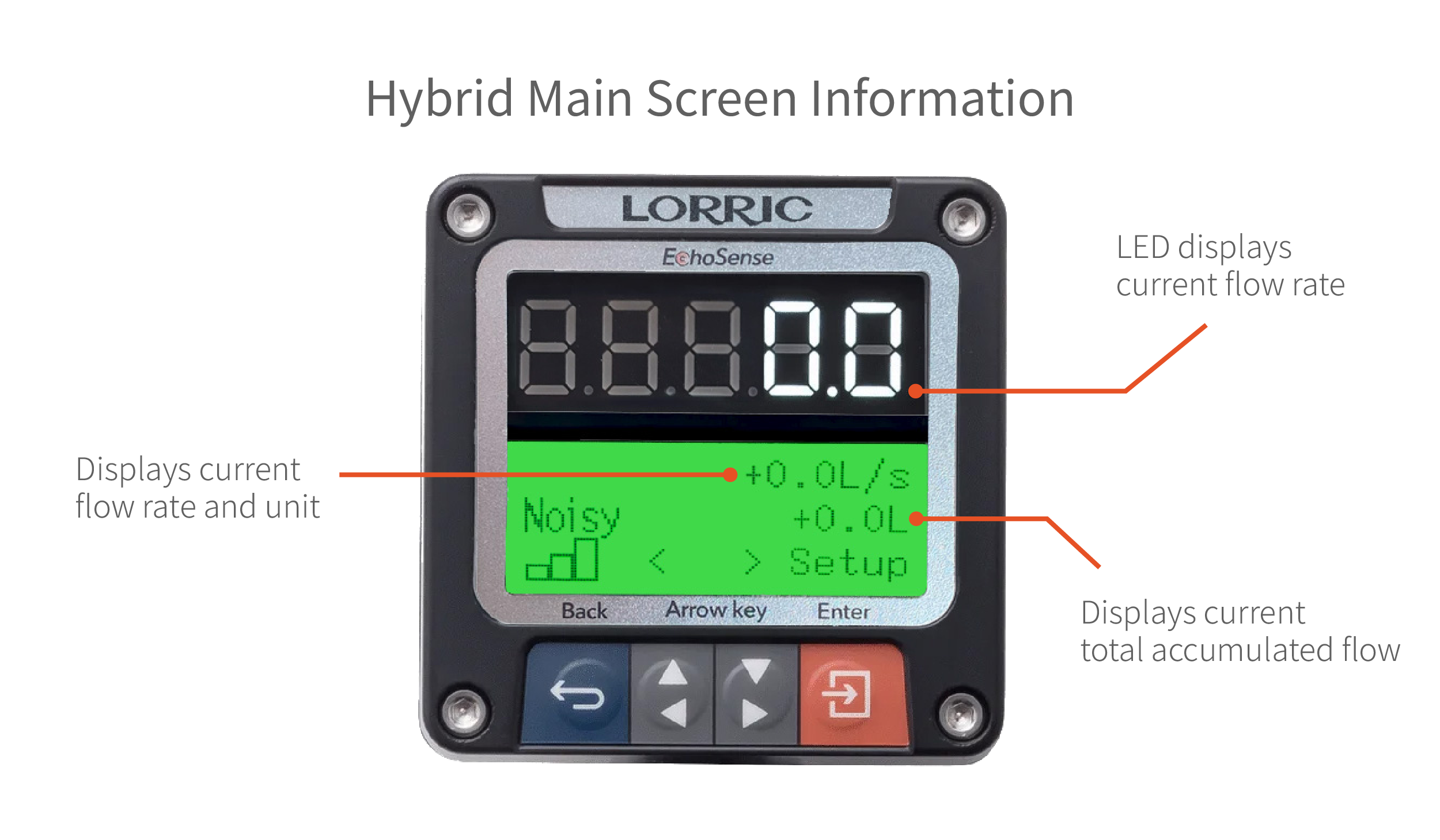
The Hybrid1 screen displays **Instant Flowrate** and **Total Flow** at the same time.\
The LED display shows data up to five digits. The first line of the LCD shows **Instant Flowrate**, the second line shows **Total Flow**, and the third line shows the flow signal on the lower left and **Setup** on the lower right. Press the orange button to open the **Settings screen**.
Instant flow units can be adjusted in [B01 Vol. Unit](/qr/fu-es-echosense-instruction-manual/parameters/b-unit/b01-vol.unit.md) and [B02 Time Unit](/qr/fu-es-echosense-instruction-manual/parameters/b-unit/b02-time-unit.md), while total flow units can be adjusted in [B03 Total Unit](/qr/fu-es-echosense-instruction-manual/parameters/b-unit/b03-total-unit.md).
{% hint style="info" %}
The **Hybrid1** home screen is available from **firmware version P1203 onward**.
{% endhint %}
### H09 Home Page Setting
The [**H09 Home Page**](/qr/fu-es-echosense-instruction-manual/parameters/h-system/h09-home-page.md) parameter allows you to select which screen is displayed at startup.
Button Functions(Click to Expand)
When the main screen is displayed in **green backlight**, the four buttons function as follows:
* **Blue Button (leftmost):** Return, exit, or save settings.
* Gray Direction Buttons:
* **Left Gray:** Previous Page, decrease value, or select item
* **Right Gray:** Next Page, increase value, or select item
* **Orange Button (rightmost):** Rightmost button: Enter settings, edit, or confirm selection
{% hint style="danger" %}
**Do not hold buttons for extended periods to avoid damage.**
{% endhint %}
{% hint style="info" %}
Button functions may change depending on the operation context to improve usability or prevent accidental presses.
{% endhint %}
```
H09 Home Page Setting Steps
• From the main screen (green backlight),
press Orange Button (Setup) to enter settings (orange backlight).
• Use Gray Arrow Buttons to select H. System, then press Orange Button (Enter).
• Use Gray Arrow Buttons to select H09 Home Page, then press Orange Button (Enter).
• Use Gray Arrow Buttons to choose an option.
• Press Orange Button (Set) to confirm.
• Press Blue Button (ESC) to return to the main screen (green backlight).
```
---
# Agent Instructions
This documentation is published with GitBook. GitBook is the documentation platform designed so that both humans and AI agents can read, navigate, and reason over technical content effectively. Learn more at gitbook.com.
## Querying This Documentation
If you need additional information that is not directly available in this page, you can query the documentation by asking a question.
Perform an HTTP GET request on the following URL with the `ask` and `goal` query parameters:
```
GET https://docs.lorric.com/qr/fu-es-echosense-instruction-manual/user-interface/monitor-page-explanation.md?ask=&goal=
```
`ask` is the immediate question: it should be specific, self-contained, and written in natural language.
`goal` is what the user is ultimately trying to achieve, the reason they need the answer. Sharing it helps GitBook give you a better, more relevant answer. A goal is most helpful when it describes the outcome the user wants rather than restating the question. For example, with `ask=how do I create an API token`, a goal like `automate deployments from our CI pipeline` lets GitBook tailor the answer to that use case.
The response will contain a direct answer to the question and relevant excerpts and sources from the documentation.
Use this mechanism when the answer is not explicitly present in the current page, you need clarification or additional context, or you want to retrieve related documentation sections.

 **Orange Button (rightmost):** Enter settings, edit, or confirm selection.
## Main Screen Menu
### Screen 1: Flowrate
Displays instant flowrate.\
The LED display shows data up to five digits. The first line of the LCD shows the flow unit **(L/m)**, the second line shows **Instant Flowrate**, and the third line shows the flow signal on the lower left and **Setup** on the lower right. Press the orange button to open the **Settings screen**.
**Orange Button (rightmost):** Enter settings, edit, or confirm selection.
## Main Screen Menu
### Screen 1: Flowrate
Displays instant flowrate.\
The LED display shows data up to five digits. The first line of the LCD shows the flow unit **(L/m)**, the second line shows **Instant Flowrate**, and the third line shows the flow signal on the lower left and **Setup** on the lower right. Press the orange button to open the **Settings screen**.


-2.jpg?alt=media&token=49799fc5-fe35-4f33-98a4-455fb5d8d133)
-2.jpg?alt=media&token=3942f3b9-2441-473e-88bb-467fbb53c8bd)
.jpg?alt=media&token=efb1329f-6a92-4170-a961-f78f02535ec4)