# E15 Byte Format

### Definition

Sets the data format for Modbus RTU communication. Default: N,8,1 (No parity, 8 data bits, 1 stop bit).

This parameter offers **four byte packet formats**:

| Option | Name                            |
| ------ | ------------------------------- |
| N.8.1  | No parity bit with 1 stop bit   |
| N.8.2  | No parity bit with 2 stop bits  |
| O.8.1  | Odd parity bit with 1 stop bit. |
| E.8.1  | Even parity bit with 1 stop bit |

The diagram below illustrates each packet format. **ST** represents the start bit, **D0–D7** are data bits, **SP** is the stop bit, **OP** indicates odd parity, and **EP** indicates even parity.\
(Each diamond shape represents one bit.)

<div align="left"><figure><img src="https://docs.lorric.com/qr/~gitbook/image?url=https%3A%2F%2F598628291-files.gitbook.io%2F%7E%2Ffiles%2Fv0%2Fb%2Fgitbook-x-prod.appspot.com%2Fo%2Fspaces%252FYbqXsfQyaXKmr6mxssGy%252Fuploads%252FLsx1JRjVa9908XZc3c1a%252Fuart_byte_format.png%3Falt%3Dmedia%26token%3D05c4ddf7-0fbe-4487-85f4-3cde6a2c2147&#x26;width=768&#x26;dpr=4&#x26;quality=100&#x26;sign=674c2433&#x26;sv=2" alt=""><figcaption></figcaption></figure></div>

#### **Modbus Formats** Converter

{% embed url="<https://codepen.io/philo_lorric/pen/BagqoRj>" %}

### Notes

1. This parameter cannot be modified via RS485.&#x20;
2. For details, refer to the [RS485 and Modbus RTU ](https://docs.lorric.com/qr/fu-es-echosense-instruction-manual/communication/rs485-setup)Settings section.

### Operation Procedure

<details>

<summary><strong>Button Functions</strong> <em>(Click to Expand)</em></summary>

When the main screen is displayed in **green backlight**, the four buttons function as follows:

* <img src="https://4028902321-files.gitbook.io/~/files/v0/b/gitbook-x-prod.appspot.com/o/spaces%2FSBz5Tlpy8GCIkK4ygkgZ%2Fuploads%2FRnX1fMK1ja5FUx043ZYc%2Fimage?alt=media&#x26;token=f31dd577-ba27-4369-af8b-25ce9afcd1f9" alt="" data-size="line"> **Blue Button (leftmost):** Return, exit, or save settings.
* Gray Direction Buttons:
  * <img src="https://4028902321-files.gitbook.io/~/files/v0/b/gitbook-x-prod.appspot.com/o/spaces%2FSBz5Tlpy8GCIkK4ygkgZ%2Fuploads%2FR48KXgI2flteQ78PYH8a%2Fimage?alt=media&#x26;token=b5b4ab82-6f88-44c6-8b85-181c7bde6fe9" alt="" data-size="line"> **Left Gray:** Previous Page, decrease value, or select item
  * <img src="https://4028902321-files.gitbook.io/~/files/v0/b/gitbook-x-prod.appspot.com/o/spaces%2FSBz5Tlpy8GCIkK4ygkgZ%2Fuploads%2FVWLxHCjTZgj8Y3CXUn6X%2Fimage?alt=media&#x26;token=35556f59-f963-4b03-8db1-34f2953ddb58" alt="" data-size="line"> **Right Gray:** Next Page, increase value, or select item
* <img src="https://4028902321-files.gitbook.io/~/files/v0/b/gitbook-x-prod.appspot.com/o/spaces%2FSBz5Tlpy8GCIkK4ygkgZ%2Fuploads%2F0lsHAW4cWIphk6mKtEoK%2Fbutton-orange.png?alt=media&#x26;token=9168c231-821c-4895-9194-0cf61b2fd06a" alt="" data-size="line"> **Orange Button (rightmost):** Rightmost button: Enter settings, edit, or confirm selection

{% hint style="danger" %}
**Do not hold buttons for extended periods to avoid damage.**
{% endhint %}

{% hint style="info" %}
Button functions may change depending on the operation context to improve usability or prevent accidental presses.
{% endhint %}
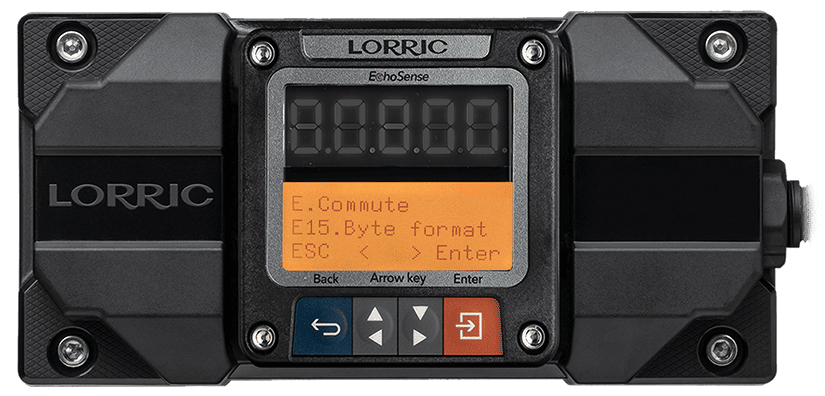
</details>

```
E15 Byte Format Setting Steps
• From the main screen (green backlight), 
  press Orange Button (Setup) to enter settings (orange backlight).
• Use Gray Arrow Buttons to select E. Commute  , press Orange Button (Enter).
• Use Gray Arrow Buttons to select E15 Byte, press Orange Button (Enter).
• Use Gray Arrow Buttons to choose the options. 
• Press Orange Button (Set) to confirm.
• Press Blue Button (ESC) to return to the main screen (green backlight).
```

<figure><img src="https://4028902321-files.gitbook.io/~/files/v0/b/gitbook-x-prod.appspot.com/o/spaces%2FSBz5Tlpy8GCIkK4ygkgZ%2Fuploads%2FVaR0X8AReaTXl5C1Ro7h%2Ffu-es-E15-en.png?alt=media&#x26;token=e1736702-b4c3-4994-93bf-b01302aa3929" alt="" width="563"><figcaption></figcaption></figure>

### E15 Options, RS485 Values, Read/Write Commands, and Formats

<table><thead><tr><th width="196.08984375">Option</th><th>Description</th><th>RS-485 Value</th><th data-hidden>RS-485 對應數字</th></tr></thead><tbody><tr><td>N.8.1 (Default)</td><td>No parity, 8 data bits, 1 stop bit</td><td>-</td><td>0</td></tr><tr><td>N.8.2</td><td>No parity, 8 data bits, 1 stop bit</td><td>-</td><td>3</td></tr><tr><td>O.8.1</td><td>Odd parity, 8 data bits, 1 stop bit</td><td>-</td><td>2</td></tr><tr><td>E.8.1</td><td>Even parity, 8 data bits, 1 stop bit</td><td>-</td><td>1</td></tr></tbody></table>

> This parameter **cannot be modified via RS485**.
