> For the complete documentation index, see [llms.txt](https://docs.lorric.com/qr/llms.txt). Markdown versions of documentation pages are available by appending `.md` to page URLs; this page is available as [Markdown](https://docs.lorric.com/qr/fpas310-zhong-wen-v5/user-interface/monitor-page-explanation.md).
# 主畫面
FP-AS310 共 **6 個主畫面**,可透過 [**H11 開發模式**](/qr/fpas310-zhong-wen-v5/parameters/h-xi-tong-xiang-guan-she-ding/h11-kai-ji-hua-mian.md) 功能調整開機後首頁顯示的主畫面。H11 操作說明請見本頁最末章節。
主畫面顯示顏色為綠燈,在主畫面時,四個按鈕的功能分別為:
* **藍鍵:**最左邊的按鍵,返回上一頁、離開目前操作或存檔
方向鍵-灰鍵:
* **左灰鍵** - 用於翻頁、增大數值、選擇不同項目
* **右灰鍵** - 用於翻頁、減小數值、選擇不同項目
* **橘鍵:**最右邊的按鍵,進入設定、編輯或確認目前選擇
## 主畫面功能表
### 畫面1:Flowrate 流量
LCD第一行顯示流量單位,第二行顯示 "瞬時流量",第三行右下顯示Setup,表示按下橘鍵後會進入設定頁面。
### 畫面2:Total 累積量
LCD 第一行顯示累積流量單位(**L**),第二行顯示「**累積流量**」,第三行右下顯示 **Setup**,表示按下橘鍵後會進入設定頁面。
累積流量單位可至 [ B03 Total Unit (累計體積單位)](/qr/fpas310-zhong-wen-v5/parameters/b-dan-wei-xiang-guan-she-ding/b03-lei-ji-ti-ji-dan-wei.md)[ ](/qr/fpas310-zhong-wen-v5/parameters/b-dan-wei-xiang-guan-she-ding/b03-lei-ji-ti-ji-dan-wei.md)調整。
> ⓘ 模擬模式下的流量也會加總至累積流量中。
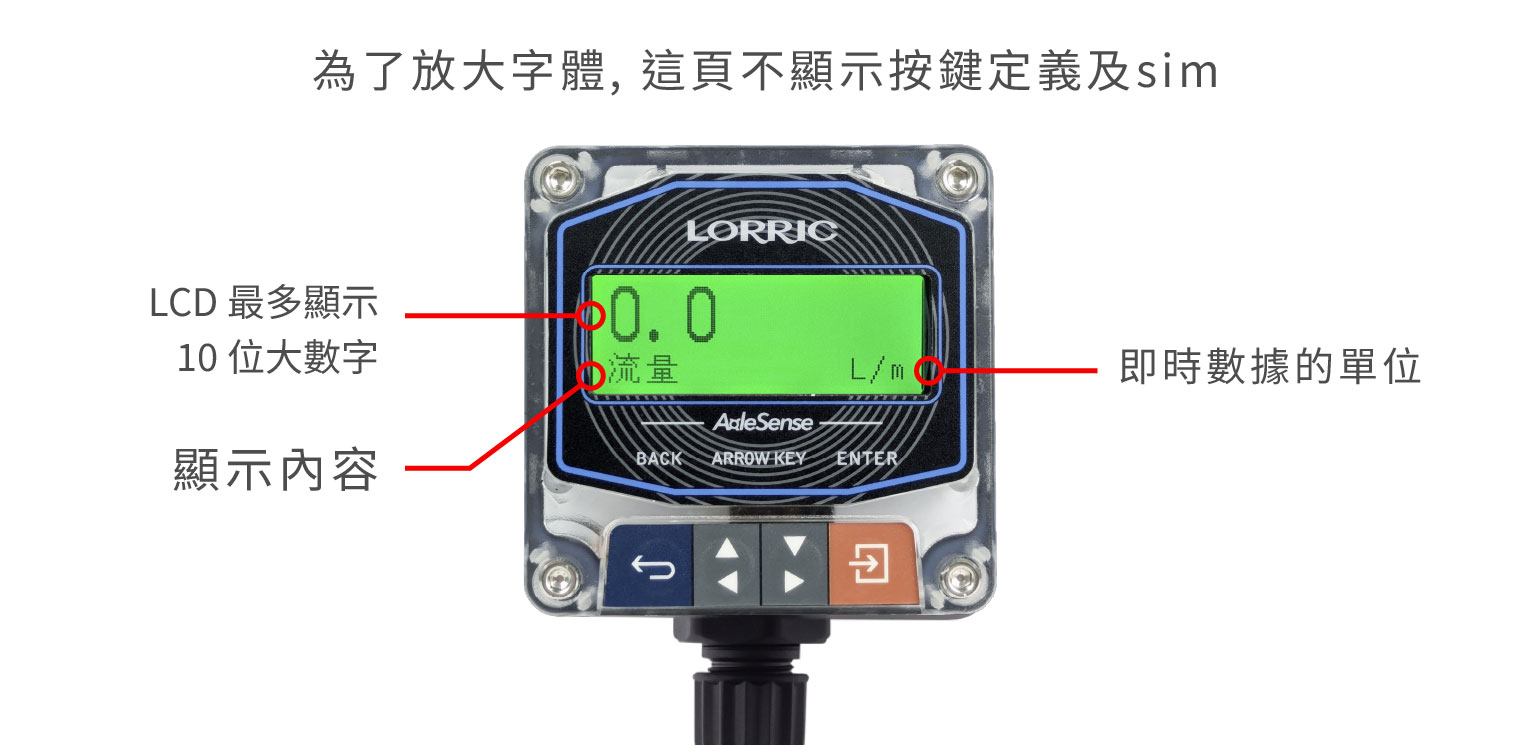
### 畫面3:Flowrate \ 流量<大>
顯示瞬時流量,數字放大顯示,易於觀測。
LCD 螢幕顯示大數字為瞬時流量,底部右下顯示流速單位 L/m,在此頁面,按下右下橘鍵後也會進入設定頁面。
流量單位可至 [B01 Vol. Unit (流量體積單位) ](/qr/fpas310-zhong-wen-v5/parameters/b-dan-wei-xiang-guan-she-ding/b01-liu-liang-ti-ji-dan-wei.md)和 [B02 Time Unit (流量時間單位)](/qr/fpas310-zhong-wen-v5/parameters/b-dan-wei-xiang-guan-she-ding/b02-liu-liang-shi-jian-dan-wei.md) 調整。
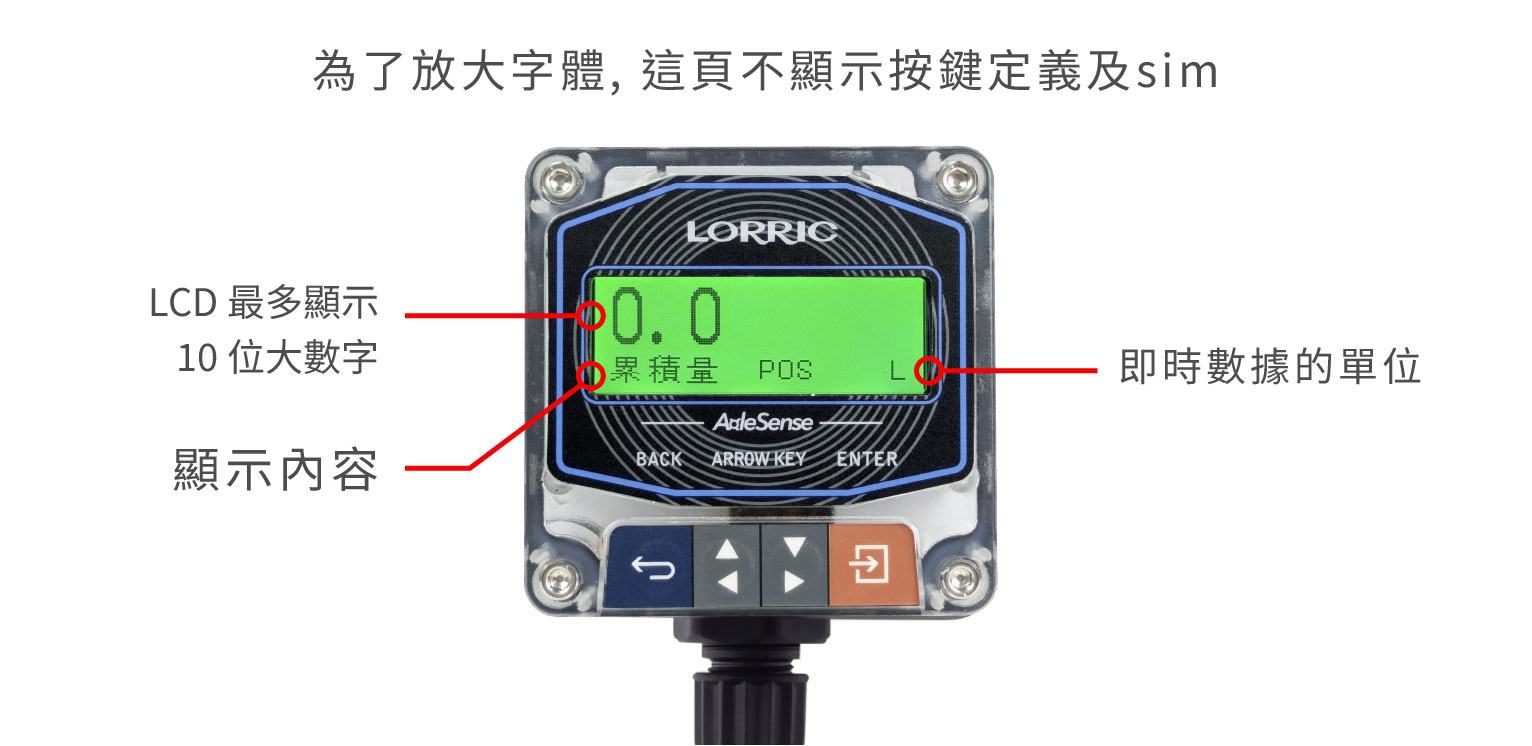
### 畫面4:Total \ 累積量<大>
顯示累積流量,數字放大顯示,易於觀測。
LCD 螢幕顯示大數字為 "累積量",底部顯示之 "POS" 表示為正向 ,右下顯示累積流量單位L,
在此頁面,按下右下橘鍵後也會進入設定頁面。
累積流量單位可至[ B03 Total Unit (累計體積單位)](/qr/fpas310-zhong-wen-v5/parameters/b-dan-wei-xiang-guan-she-ding/b03-lei-ji-ti-ji-dan-wei.md) 調整。
{% hint style="info" %}
模擬模式下的流量也會加總至累積流量中。
{% endhint %}
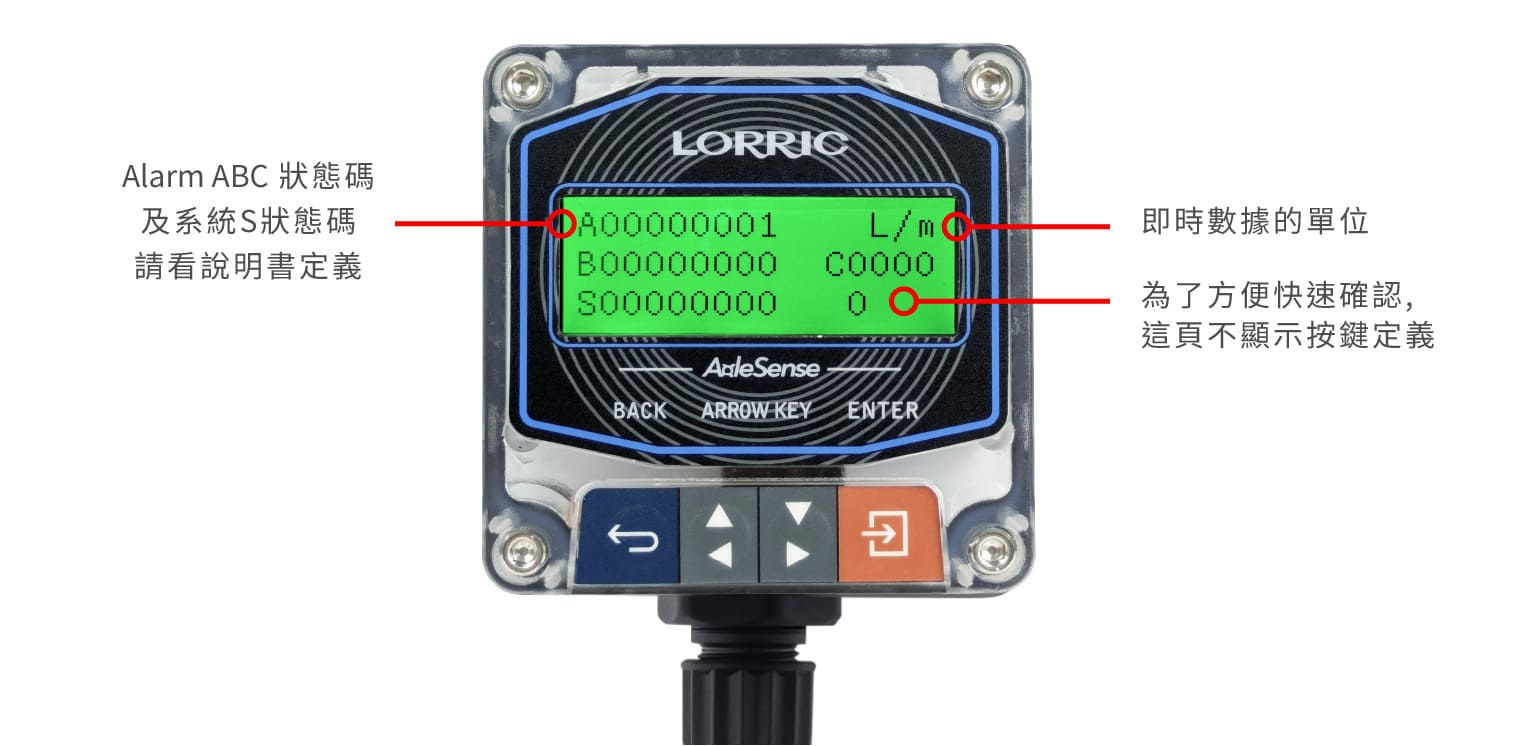
### 畫面5:Status Page 狀態確認
系統狀態與診斷,顯示 Alarm A、B、C 狀態碼以及系統S狀態碼。發現流量計顯示紅燈,表示有問題需要排除,可以切換到此畫面,確認流量計異常情況。狀態解讀請參考:[Alarm 及 系統狀態說明](/qr/fpas310-zhong-wen-v5/user-interface/alarm-priority-and-display-method.md)
{% hint style="info" %}
出現問題時請錄影或拍下本頁供原廠確認
{% endhint %}
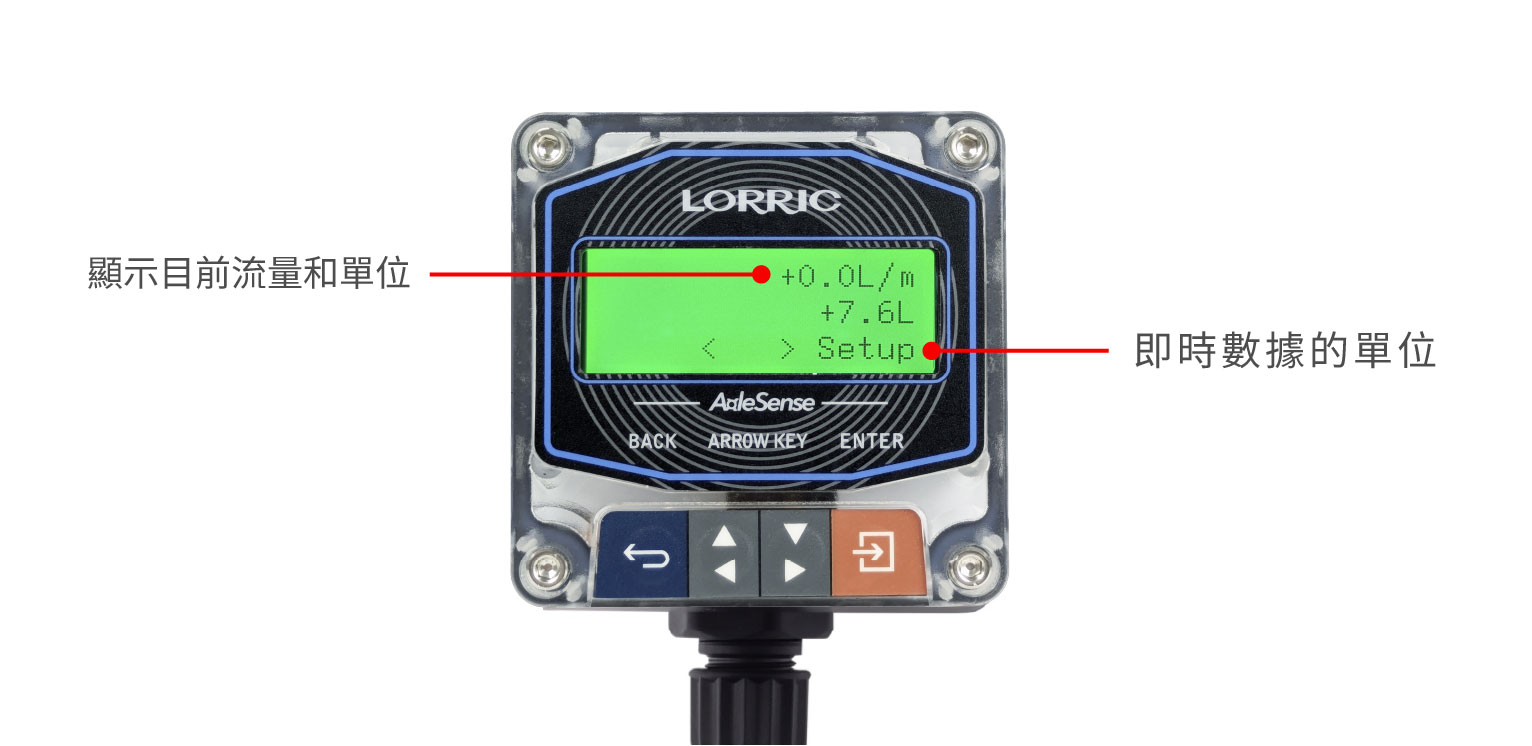
### 畫面6:混合畫面 Hybrid1
複合式監測,同時顯 "瞬時流量" 和 "累積流量"。
LCD第一行顯示 "瞬時流量" ,第二行顯示"累積流量",第三行左下顯示流量訊號,右下顯示Setup,表示按下橘鍵後會進入設定頁面。
瞬時流量單位可至 [B01 Vol. Unit (流量體積單位)](/qr/fpas310-zhong-wen-v5/parameters/b-dan-wei-xiang-guan-she-ding/b01-liu-liang-ti-ji-dan-wei.md) 和[ B02 Time Unit (流量時間單位) ](/qr/fpas310-zhong-wen-v5/parameters/b-dan-wei-xiang-guan-she-ding/b02-liu-liang-shi-jian-dan-wei.md)調整;累積流量單位可至 [B03 Total Unit (累計體積單位)](/qr/fpas310-zhong-wen-v5/parameters/b-dan-wei-xiang-guan-she-ding/b03-lei-ji-ti-ji-dan-wei.md) 調整。
---
# Agent Instructions
This documentation is published with GitBook. GitBook is the documentation platform designed so that both humans and AI agents can read, navigate, and reason over technical content effectively. Learn more at gitbook.com.
## Querying This Documentation
If you need additional information that is not directly available in this page, you can query the documentation dynamically by asking a question.
Perform an HTTP GET request on the current page URL with the `ask` query parameter, and the optional `goal` query parameter:
```
GET https://docs.lorric.com/qr/fpas310-zhong-wen-v5/user-interface/monitor-page-explanation.md?ask=&goal=
```
`ask` is the immediate question: it should be specific, self-contained, and written in natural language.
`goal` is optional and describes the broader end goal you are ultimately trying to accomplish on behalf of the user. GitBook uses it to tailor the answer towards what is most useful for that goal.
The response will contain a direct answer to the question and relevant excerpts and sources from the documentation.
Use this mechanism when the answer is not explicitly present in the current page, you need clarification or additional context, or you want to retrieve related documentation sections.

 **藍鍵:**最左邊的按鍵,返回上一頁、離開目前操作或存檔
方向鍵-灰鍵:
*
**藍鍵:**最左邊的按鍵,返回上一頁、離開目前操作或存檔
方向鍵-灰鍵:
*  **左灰鍵** - 用於翻頁、增大數值、選擇不同項目
*
**左灰鍵** - 用於翻頁、增大數值、選擇不同項目
*  **右灰鍵** - 用於翻頁、減小數值、選擇不同項目
*
**右灰鍵** - 用於翻頁、減小數值、選擇不同項目
*  **橘鍵:**最右邊的按鍵,進入設定、編輯或確認目前選擇
## 主畫面功能表
### 畫面1:Flowrate 流量
LCD第一行顯示流量單位,第二行顯示 "瞬時流量",第三行右下顯示Setup,表示按下橘鍵後會進入設定頁面。
**橘鍵:**最右邊的按鍵,進入設定、編輯或確認目前選擇
## 主畫面功能表
### 畫面1:Flowrate 流量
LCD第一行顯示流量單位,第二行顯示 "瞬時流量",第三行右下顯示Setup,表示按下橘鍵後會進入設定頁面。