> For the complete documentation index, see [llms.txt](https://docs.lorric.com/qr/llms.txt). Markdown versions of documentation pages are available by appending `.md` to page URLs; this page is available as [Markdown](https://docs.lorric.com/qr/fpas310-zhong-wen-v5/user-interface/alarm-priority-and-display-method-1.md).

# Alarm 及 系統狀態說明 - R

{% hint style="info" %}
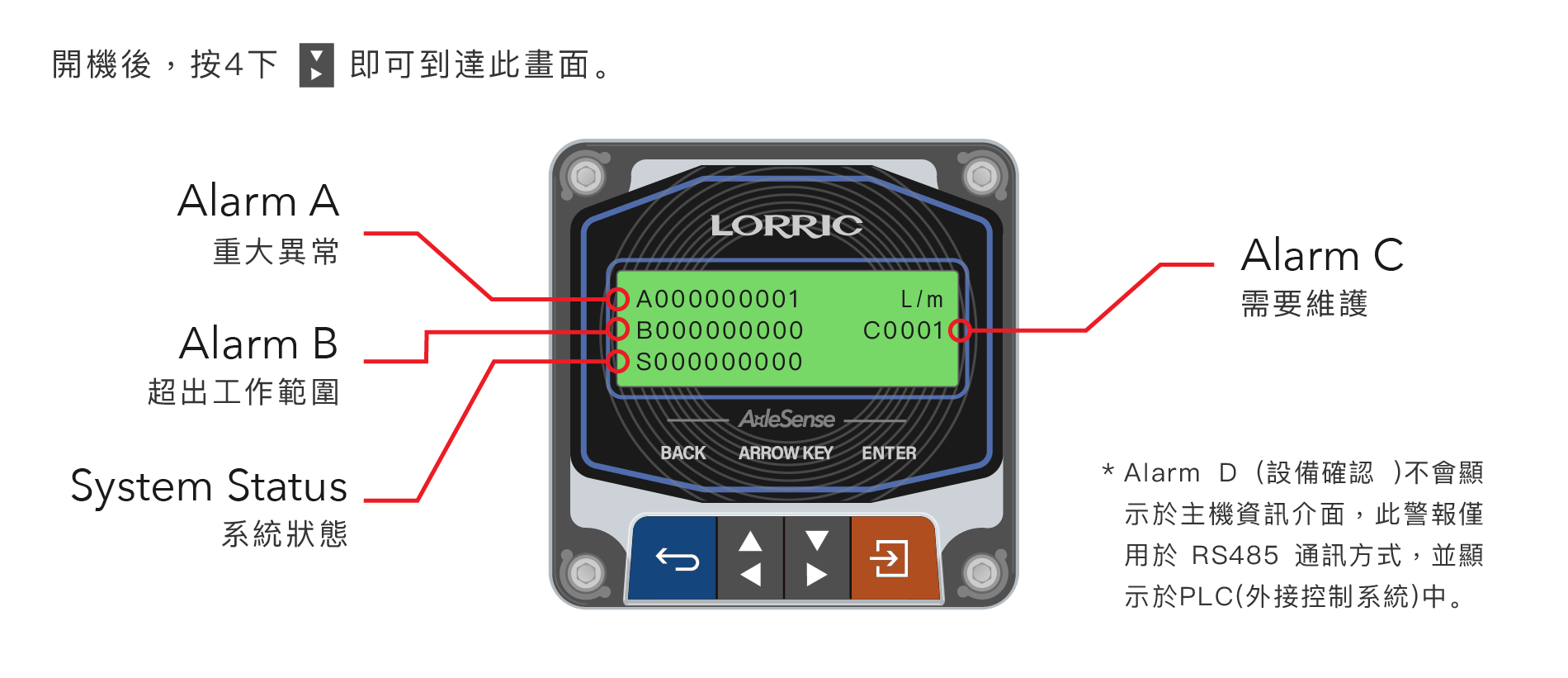
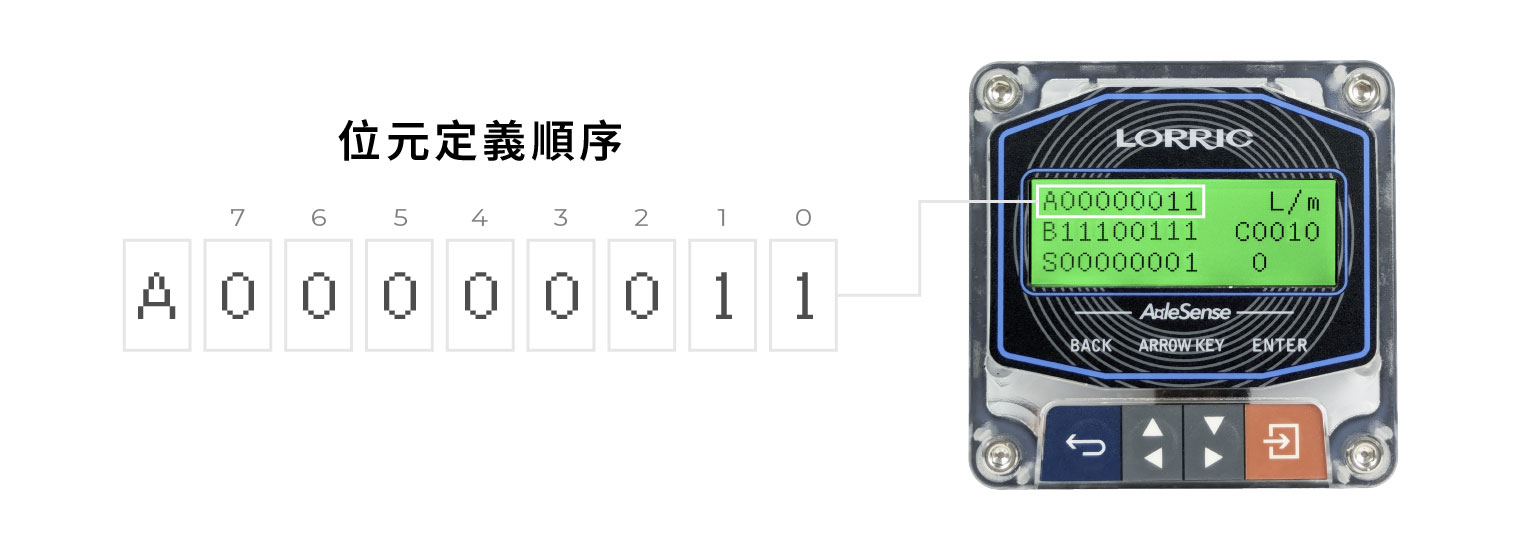
位元編號由**右至左**排列，從小到大，最右側為位元**0**。\
當位元顯示為 **1** 時，表示已觸發警報或用作狀態指示，請參考下表確認各系統狀態說明。
{% endhint %}

<figure><img src="/files/VunhmTynrGYfAtlbGhDW" alt=""><figcaption></figcaption></figure>

## Alarm - A 重大異常 Failed

<figure><img src="/files/kyuaUMYQy8nGNf3ZPgAE" alt=""><figcaption></figcaption></figure>

系統依據 **NAMUR NE107** 標準中的 **「Failed（失敗）」嚴重性等級**對此警報進行分類。

此警報在以下故障條件下觸發：

* **蹼輪功能異常**
* **磁場干擾**
* **內部晶片或感測器錯誤**

當 Alarm - A 啟動時，主畫面 LCD 背光**閃爍紅燈**，表示發生**嚴重系統故障**。

<table data-header-hidden><thead><tr><th width="111"></th><th width="177"></th><th width="139"></th><th width="149.79998779296875"></th></tr></thead><tbody><tr><td>警報位元 (Alarm bit)</td><td>定義名稱 - 錯誤內容</td><td>對應參數代碼 (Alarm Code)</td><td>Alarm 觸發條件</td></tr><tr><td>7</td><td>　NA</td><td></td><td>　</td></tr><tr><td>6</td><td>　NA</td><td></td><td>　</td></tr><tr><td>5</td><td>　NA</td><td></td><td>　</td></tr><tr><td>4</td><td>　NA</td><td></td><td>　</td></tr><tr><td>3</td><td>　NA</td><td></td><td>　</td></tr><tr><td>2</td><td>    NA</td><td></td><td>　</td></tr><tr><td>1</td><td>磁場干擾</td><td>D02</td><td>裝置附近偵測到強磁場，干擾 AxleSense 感測功能。</td></tr><tr><td>0</td><td>蹼輪異常</td><td>D01</td><td>無法偵測到蹼輪旋轉。請確認蹼輪可自由旋轉、管路充滿液體，且蹼輪元件完整無損。</td></tr></tbody></table>

{% hint style="info" %}
**D01 蹼輪警報（Paddle Ala）** 預設設定為**勿擾**（數值 = 2）。在此模式下，警報位元會記錄於錯誤碼暫存器中，但 LCD 背光**不會**變色。將 **D01** 設為**開啟**（數值 = 1）以啟用 LCD 警報顏色指示。
{% endhint %}

## Alarm - B 超出工作範圍 Out of Specification

<figure><img src="/files/kqAzGyI7yyOsmiREHJTP" alt=""><figcaption></figcaption></figure>

表示流量計超過使用設計範圍，系統異常等級建議同 NAMUR NE107 標準中提到的 Out of Specification 訊息等級。

用來表示流量超過設定範圍及其它需注意事項。可在參數 D 大類中設定。

主畫面LCD 背光變為**持續紅光**。

Alarm - B 錯誤碼定義從高位元(第7位)到低位元(第0位)，每個位元代表如下：

| 警報位元 (Alarm bit) | 定義名稱 - 錯誤內容   | 對應參數代碼 (Alarm Code) | Alarm 觸發條件                                                         |
| ---------------- | ------------- | ------------------- | ------------------------------------------------------------------ |
| 7                | NA            |                     |                                                                    |
| 6                | 累計流量超過或低於設定目標 | D08                 | <p>累計流量大於或小於預設目標<br><mark style="color:$danger;">\*(註一)</mark></p> |
| 5                | NA            |                     |                                                                    |
| 4                | NA            |                     | 　                                                                  |
| 3                | NA            |                     |                                                                    |
| 2                | NA            |                     |                                                                    |
| 1                | 瞬時流量大於上限      | D04                 | 瞬時流量超過 **D05 Up LIM** 設定的上限值                                       |
| 0                | 瞬時流量小於下限      | D04                 | 瞬時流量低於 **D06 Low LIM** 設定的下限值                                      |

<mark style="color:$danger;">\*註一</mark>

```
D08、D09、D10 累計警報說明
範例一：正向流量
啟用D08累計警報，D09累計條件設定為"大於目標"，
D10累計目標設定為正數，如 +100。
當正向流量累計超過 100 時，系統會觸發累計警報。
範例二：負向流量
啟用D08累計警報，D09累計條件設定為"小於目標"，
D10累計目標設定為負數，如 -500。
當負向流量累計小於 -500 時，系統會觸發累計警報。
```

{% hint style="info" %}
**D04 FlowLIM Ala（流量範圍警報）** 預設設定為**關閉**（數值 = 0）。將 **D04** 設為**開啟**（1）或**勿擾**（2）以啟用流量範圍警報監控。詳細設定請參閱 **D 警報與資訊** 參數章節。
{% endhint %}

## Alarm - C 需要維護 Maintenance Required

<figure><img src="/files/ewvwQ5fCFcU2MkgBKstE" alt=""><figcaption></figcaption></figure>

> ⓘ **FP-AS310R 無類比輸出（4–20 mA）功能**，因此 Alarm C 所有位元均為 NA，此版本裝置不會觸發 Alarm C。

表示流量計需維護，系統異常等級建議同 NAMUR NE107 標準中提到的 Maintenance Required 訊息等級。

主畫面LCD 背光變為**持續紅光**。

Alarm - C 錯誤碼定義從高位元(第7位)到低位元(第0位)，每個位元代表如下：

<table data-header-hidden><thead><tr><th width="118.20001220703125"></th><th width="171.4000244140625"></th><th width="154.59991455078125"></th><th width="170.199951171875"></th></tr></thead><tbody><tr><td>警報位元 (Alarm bit)</td><td>定義名稱 - 錯誤內容</td><td>對應參數代碼 (Alarm Code)</td><td>Alarm 觸發條件</td></tr><tr><td>7</td><td>NA</td><td></td><td>　</td></tr><tr><td>6</td><td>NA</td><td></td><td>　</td></tr><tr><td>5</td><td>NA</td><td></td><td>　</td></tr><tr><td>4</td><td>NA</td><td></td><td>　</td></tr><tr><td>3</td><td>NA</td><td></td><td>　</td></tr><tr><td>2</td><td>NA</td><td></td><td>　</td></tr><tr><td>1</td><td>NA</td><td></td><td>　</td></tr><tr><td>0</td><td>NA</td><td></td><td>　</td></tr></tbody></table>

## Alarm - D 設備確認中 Function Check

系統異常等級建議同 NAMUR NE107 標準中提到的 Function Check 訊息等級。

當主機因人為操作，沒有正常在監控時，這個位元會變為1。

在設定畫面LCD 背光變為**持續橘光**。

Alarm - D 錯誤碼定義從高位元(第7位)到低位元(第0位)，每個位元代表如下：&#x20;

> ⓘ Alarm D **不會**以獨立的列顯示於 LCD 警報畫面。橘色背光為唯一的畫面指示。此狀態亦可透過 Modbus 暫存器位址 **0x0011**（error code d）位元 0 讀取。

<table data-header-hidden><thead><tr><th width="119"></th><th width="177"></th><th width="146.79998779296875"></th><th width="154.79998779296875"></th></tr></thead><tbody><tr><td>警報位元 (Alarm bit)</td><td>定義名稱 - 錯誤內容</td><td>對應參數代碼 (Alarm Code)</td><td>Alarm 觸發條件</td></tr><tr><td>7</td><td>NA</td><td></td><td>　</td></tr><tr><td>6</td><td>NA</td><td></td><td>　</td></tr><tr><td>5</td><td>NA</td><td></td><td>　</td></tr><tr><td>4</td><td>NA</td><td></td><td>　</td></tr><tr><td>3</td><td>NA</td><td></td><td>　</td></tr><tr><td>2</td><td>NA</td><td></td><td>　</td></tr><tr><td>1</td><td>NA</td><td></td><td>　</td></tr><tr><td>0</td><td>非監控畫面</td><td>NA</td><td>裝置處於設定選單、模擬模式或其他手動操作，目前未顯示主監控畫面。</td></tr></tbody></table>

## System Status 系統狀態

<figure><img src="/files/SnBoTMg7FMWLFXTpDsBk" alt=""><figcaption></figcaption></figure>

> ⓘ **FP-AS310R 無 NPN/OCT 輸出功能**，因此 System Status 所有位元均為 NA，此版本裝置不會觸發 System Status 狀態碼。

狀態碼定義從高位元(第7位)到低位元(第0位)，每個位元代表如下：&#x20;

<table data-header-hidden><thead><tr><th width="107"></th><th width="181"></th><th width="138.7999267578125"></th><th width="154"></th></tr></thead><tbody><tr><td>警報位元 (Alarm bit)</td><td>定義名稱 - 錯誤內容</td><td>對應參數代碼 (Alarm Code)</td><td>Alarm 觸發條件</td></tr><tr><td>7</td><td>NA</td><td></td><td>　</td></tr><tr><td>6</td><td>NA</td><td></td><td>　</td></tr><tr><td>5</td><td>NA</td><td></td><td>　</td></tr><tr><td>4</td><td>NA</td><td></td><td>　</td></tr><tr><td>3</td><td>NA</td><td></td><td>　</td></tr><tr><td>2</td><td>NA</td><td></td><td>　</td></tr><tr><td>1</td><td>NA</td><td></td><td>　</td></tr><tr><td>0</td><td>NA</td><td></td><td></td></tr></tbody></table>

<figure><img src="/files/yYrh9CSMlAoqEGm8sIb4" alt=""><figcaption></figcaption></figure>


---

# Agent Instructions
This documentation is published with GitBook. GitBook is the documentation platform designed so that both humans and AI agents can read, navigate, and reason over technical content effectively. Learn more at gitbook.com.

## Querying This Documentation
If you need additional information that is not directly available in this page, you can query the documentation dynamically by asking a question.

Perform an HTTP GET request on the current page URL with the `ask` query parameter, and the optional `goal` query parameter:

```
GET https://docs.lorric.com/qr/fpas310-zhong-wen-v5/user-interface/alarm-priority-and-display-method-1.md?ask=<question>&goal=<endgoal>
```

`ask` is the immediate question: it should be specific, self-contained, and written in natural language.
`goal` is optional and describes the broader end goal you are ultimately trying to accomplish on behalf of the user. GitBook uses it to tailor the answer towards what is most useful for that goal.

The response will contain a direct answer to the question and relevant excerpts and sources from the documentation.

Use this mechanism when the answer is not explicitly present in the current page, you need clarification or additional context, or you want to retrieve related documentation sections.