> For the complete documentation index, see [llms.txt](https://docs.lorric.com/qr/llms.txt). Markdown versions of documentation pages are available by appending `.md` to page URLs; this page is available as [Markdown](https://docs.lorric.com/qr/fp-as310-r-english-v5/installation-and-setup/parameter-setup.md).
# Parameter Settings
### Setup Procedure
Button Functions(Click to Expand)
The main unit has **four buttons**. The **bottom line (Line 3)** of the LCD displays the current function of each button. Under normal operation, the button functions are as follows:
* **Blue Button -** Leftmost button: Return, exit, or save settings.
Gray Arrow Buttons:
* **Left Gray Button:** Previous Page, decrease value, or select item
* **Right Gray Button:** Next Page, increase value, or select item
* **Orange Button:** Rightmost button: Enter settings, edit, or confirm selection
{% hint style="danger" %}
**Do not hold buttons for extended periods to avoid damage.**
{% endhint %}
{% hint style="info" %}
Button functions may change depending on the operation context to improve usability or prevent accidental presses.
{% endhint %}
{% stepper %}
{% step %}
### **Language Settings**
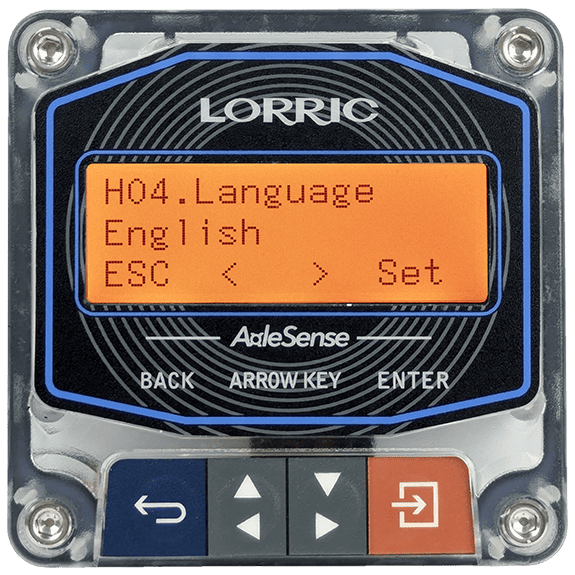
The default language is English. The unit supports English and Traditional Chinese. To change the language, go to [H04 Language](/qr/fp-as310-r-english-v5/parameters/h-system/h04-language.md).
{% code fullWidth="false" expandable="true" %}
```
H04 Language Setting Steps
• From the main screen(green backlight),
press Orange Button(Setup) to enter settings(orange backlight).
• Use Gray Arrow Buttons to select H.System, press Orange Button(Enter).
• Select H04 Language, press Orange Button(Enter).
• Choose language, press Orange Button(Set) to set choosen language.
• Press Orange Button(Set) again to confirm.
• Press Blue Button(ESC) to return to main screen.
```
{% endcode %}
{% endstep %}
{% step %}
### Pipe Type Setting
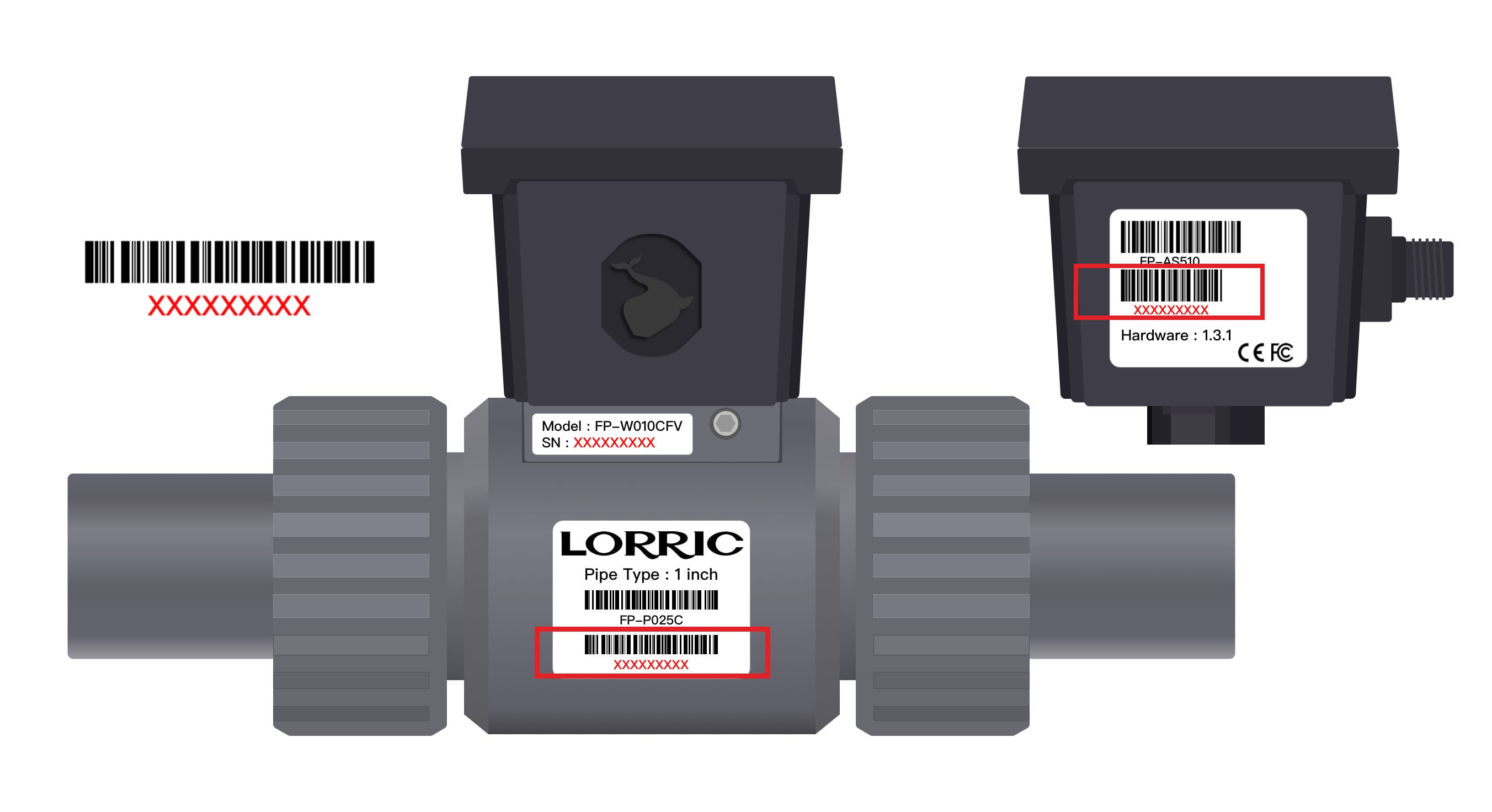
The FP-AS310 uses a pre-calibrated **T-connector (tee fitting)** matched to the main unit. Selecting the correct pipe type in **A01** is critical for accurate measurement.\
Before use, please confirm whether the serial number of the main unit matches the serial number of the tee fitting.
Before setting the pipe type, check the tee fitting:
* **If the tee fitting serial number matches the main unit serial number** (marked in red box)**:** The A01 setting should generally correspond to the pipe size marked on the tee fitting.
* **If the serial numbers do not match:** A01 **must still be adjusted** to match the size of the tee fitting actually used, to ensure that the correct calibration curve is applied.
{% hint style="warning" %}
All FP-AS310 units are factory-calibrated as matched tee fitting and main unit pairs. Using a mismatched combination may result in inaccurate flow measurement. The user assumes responsibility for measurement accuracy in this case.
{% endhint %}
#### A01 Pipe Type
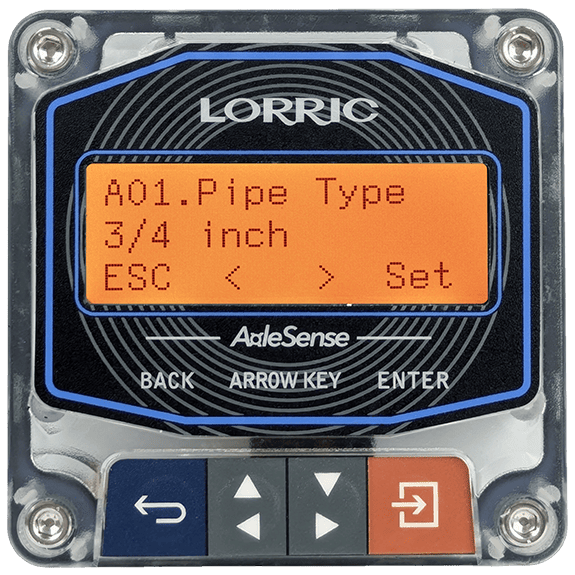
Select the T-connector spec. Please refer to [A01 Pipe Type](/qr/fp-as310-r-english-v5/parameters/a-measurement-setup/a01-pipe-type.md).
```
A01 Pipe Type Setting Steps
• From the main screen (green backlight),
press Orange Button (Setup) to enter settings (orange backlight).
• Select A. Measure by pressing Orange Button (Enter).
• Use Gray Arrow Buttons to select A01 Pipe Type, press Orange Button (Enter).
• Use Gray Arrow Buttons to choose the options.
• Press Orange Button (Set) to confirm.
• Press Blue Button (ESC) to return to the main screen (green backlight).
```
{% endstep %}
{% step %}
### **Main Screen Status Check**
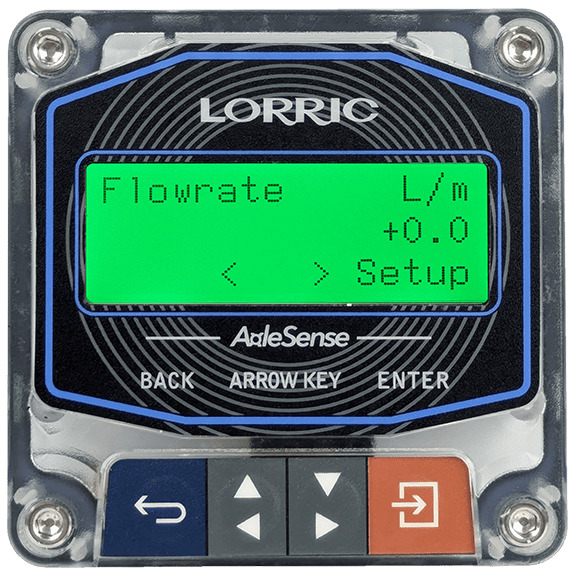
After setup, return to the main screen. The LCD backlight will return to **green**, indicating the device is in normal monitoring mode and ready to measure.\
If the flow meter is installed correctly and flow is present, the flow rate will be displayed on the main screen. Check if flow direction is expected, if there's a problem in the measurement, refer to the [troubleshooting guide](#troubleshooting).
{% hint style="info" %}
ⓘ The main screen default display is **Flowrate** in **LPM (litres per minute)**. To change the display unit or home page, refer to the **B Unit** and [**H11 Home Page**](/qr/fp-as310-r-english-v5/parameters/h-system/h11-home-page.md) parameters.
{% endhint %}
{% endstep %}
{% endstepper %}
### **Troubleshooting**
If any of the following issues occur during installation or setup, adjust the system as instructed.
Unit Adjustment
The default volume unit is **L (litres)** and the default time unit is **M (minute)**. The main screen displays **LPM** by default.
* Set volume unit: [**B01 Vol Unit**](/qr/fp-as310-r-english-v5/parameters/b-unit/b01-vol.-unit.md)
* Set time unit: [**B02 Time Unit**](/qr/fp-as310-r-english-v5/parameters/b-unit/b02-time-unit.md)
* Set total flow unit: [**B03 Total Unit**](/qr/fp-as310-r-english-v5/parameters/b-unit/b03-total-unit.md)
Incorrect Flow Direction (Reading Shows Negative or Wrong Value)
The FP-AS310 can only display positive flow. If the flow direction is reversed relative to the device installation, adjust [**A05 Direction**](/qr/fp-as310-r-english-v5/parameters/a-measurement-setup/a05-direction.md) to correct the reading.
Unstable or Fluctuating Flow Reading
If flow readings fluctuate rapidly, adjust **A04 Damping** to reduce data swings. The default damping value is 3; higher values reduce fluctuations. Set according to desired measurement stability and response speed. Refer to [**A04 Damping**](/qr/fp-as310-r-english-v5/parameters/a-measurement-setup/a04-damping.md)
Inaccurate Flow Measurement
When the measured flow is consistently higher or lower than the actual value, or need to be calibrated to match a reference meter, use [**A02 Scale Factor**](/qr/fp-as310-r-english-v5/parameters/a-measurement-setup/a02-scale-factor.md) to apply a multiplier correction to the instantaneous flow reading.
Clear Accumulated Total Flow
To reset the totalized flow counter to zero, use **C02 Del Total**.
Refer to [**C02 Del Total**](/qr/fp-as310-r-english-v5/parameters/c-total-and-history/c02-del.-total.md).
Communication Settings (RS485)
All communication-related settings are configured in the **E Commute** parameter group. This includes [Modbus ID](/qr/fp-as310-r-english-v5/parameters/e-commute/e04-modbus-id.md), [baud rate](/qr/fp-as310-r-english-v5/parameters/e-commute/e05-baud.md), [Byte Format](/qr/fp-as310-r-english-v5/parameters/e-commute/e15-byte-format.md), [bit order](/qr/fp-as310-r-english-v5/parameters/e-commute/e16-bit-order.md) and [Endianness](/qr/fp-as310-r-english-v5/parameters/e-commute/e17-endianness.md).
Refer to the [**E Commute**](/qr/fp-as310-r-english-v5/parameters/e-commute.md) parameter group.
### **Advanced Calibration Settings**
Refer to the full parameter table for detailed settings.\
See: [**Full Parameter Reference**](/qr/fp-as310-r-english-v5/parameters.md)
---
# Agent Instructions
This documentation is published with GitBook. GitBook is the documentation platform designed so that both humans and AI agents can read, navigate, and reason over technical content effectively. Learn more at gitbook.com.
## Querying This Documentation
If you need additional information that is not directly available in this page, you can query the documentation dynamically by asking a question.
Perform an HTTP GET request on the current page URL with the `ask` query parameter, and the optional `goal` query parameter:
```
GET https://docs.lorric.com/qr/fp-as310-r-english-v5/installation-and-setup/parameter-setup.md?ask=&goal=
```
`ask` is the immediate question: it should be specific, self-contained, and written in natural language.
`goal` is optional and describes the broader end goal you are ultimately trying to accomplish on behalf of the user. GitBook uses it to tailor the answer towards what is most useful for that goal.
The response will contain a direct answer to the question and relevant excerpts and sources from the documentation.
Use this mechanism when the answer is not explicitly present in the current page, you need clarification or additional context, or you want to retrieve related documentation sections.
 {% endstep %}
{% endstepper %}
### **Troubleshooting**
If any of the following issues occur during installation or setup, adjust the system as instructed.
{% endstep %}
{% endstepper %}
### **Troubleshooting**
If any of the following issues occur during installation or setup, adjust the system as instructed.