> For the complete documentation index, see [llms.txt](https://docs.lorric.com/qr/llms.txt). Markdown versions of documentation pages are available by appending `.md` to page URLs; this page is available as [Markdown](https://docs.lorric.com/qr/fp-as310-paddle-wheel-flowmeter-manual-chinese-v1/communication/rs485-setup.md).
# RS485 與 Modbus RTU 設定
{% hint style="info" %}
在設定畫面下 RS485 不會回應。
{% endhint %}
## 規格
請看[主機頁](/qr/fp-as310-paddle-wheel-flowmeter-manual-chinese-v1/dimensions-specifications-and-model-numbers/device-dimensions-specifications-and-details.md#shu-wei-tong-xun-modbus-rtu-rs485)
## 接線
請看[電機安裝頁](/qr/fp-as310-paddle-wheel-flowmeter-manual-chinese-v1/installation-and-setup/electronic-installation.md#rs485-er-xian-shi-pei-xian-tu)
## 基本參數設定
請參考[參數頁面](/qr/fp-as310-paddle-wheel-flowmeter-manual-chinese-v1/parameters.md)
設定步驟如下:
1. [請先將基本參數設定好](/qr/fp-as310-paddle-wheel-flowmeter-manual-chinese-v1/installation-and-setup/parameter-setup.md#tui-jian-can-shu-she-ding-liu-cheng)。
2. 請先以本頁的接線指示將線接好
3. 本機使用 Modbus RTU 協定,通訊參數設定如下:
1. 請設定 E04 指定本機的 Modbus ID,請確認同一個線路上沒有相同的地址。
2. 請設定 E05 指定通訊的速度 Baud,本機支援 9600, 19200, 38400。
4. 請回到主畫面。必需在主畫面下,RS485 才會工作。
5. 如果需要請使用參數 F01 及 F02 將主機設定為模擬模式以方式測試。
6. 請參考 [Modbus RTU Protocol](/qr/fp-as310-paddle-wheel-flowmeter-manual-chinese-v1/communication/modbus-rtu-protocol.md) 頁面測試要讀寫的記憶體。
7. 將 F02 關閉模擬模式。
8. 完成
### [E15 Byte format](/qr/fp-as310-paddle-wheel-flowmeter-manual-chinese-v1/parameters.md#e-tong-xun-can-shu-lie-biao)
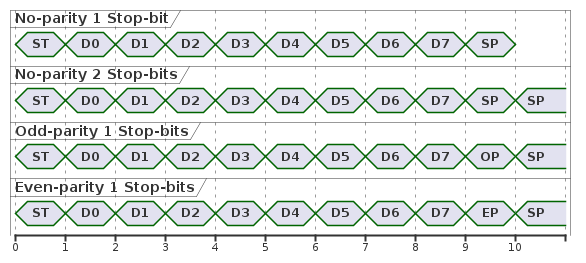
本參數提供4種 byte 封包格式
| 選項名稱 | 全名 |
| ----- | ------------------------------- |
| N.8.1 | No parity bit with 1 stop bit |
| N.8.2 | No parity bit with 2 stop bits |
| O.8.1 | Odd parity bit with 1 stop bit. |
| E.8.1 | Even parity bit with 1 stop bit |
下圖是各選項的封包圖示,其中 ST 代表 start bit,D0 \~ D7 是資料位元,SP 是 stop bit,
OP 是Odd-parity, EP stands 是 Even-parity。(每個菱形圖示是一個 bit)
### [E16 Bit order](/qr/fp-as310-paddle-wheel-flowmeter-manual-chinese-v1/parameters.md#e-tong-xun-can-shu-lie-biao)
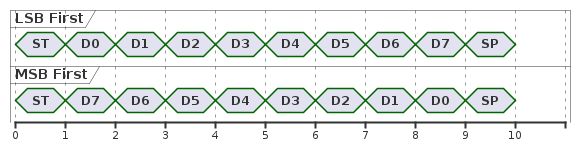
本參數可用來調整單個 byte 封包中資料位元的傳輸順序。
LSB 代表 第0位元先傳,MSB 代表第7位元先傳。其中 LSB 是最常使用的格式。以下封包圖示以 N.8.1 舉例:(下圖每個菱形圖示是一個 bit)
### [E17 Endianness](/qr/fp-as310-paddle-wheel-flowmeter-manual-chinese-v1/parameters.md#e-tong-xun-can-shu-lie-biao)
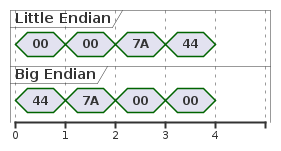
本參數用來調整 RX (流量計回傳資料) 時每個多 byte 資料的內部 byte 傳輸順序。**modbus ID、指令、CRC及單 byte 資料不受影響。** 例如要傳回傳流量及流速資料假設流量的數據是1000,回傳時,仍會先傳流量再傳流速,但是用來表達1000的這4個 byte 的傳輸順序不同,1000表示為16進制是 00007A44,以下是兩個不同格式時的順序。(下圖每個菱形圖示是一個 byte。)
#### 範例
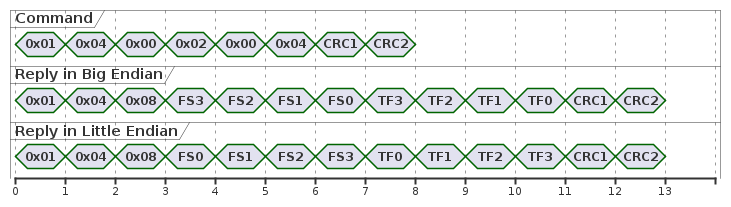
以下是使用 04 指令要求流量計傳回瞬時流速(圖示為FS+數字)及累積流量(圖示為TF+數字)的範例:(下圖每個菱形圖示是一個 byte)
第一行是主控端發出的指令。不受本設定影響,[詳細請看 modbus 04 指令](/qr/fp-as310-paddle-wheel-flowmeter-manual-chinese-v1/communication/modbus-rtu-protocol/wei-du-xing-ji-yi-ti/read-only-memory-read-instruction-04-and-memory-lists.md)。
第二行是流量計在 Big Endian 設置下的回覆。從左到右,0x01 到 0x08 及 CRC1到CRC2 不是資料不受本設定影響。瞬時流速(圖示為FS+數字)及累積流量(圖示為TF+數字)回覆順序也不受影響。因為設定為 Big Endian,瞬時流速(圖示為FS3 到 FS0) 的四個 byte 會先從 FS3 開始回覆。累積流量(圖示為TF3 到 TF0) 的四個 byte 會先從 TF3 開始回覆。
第三行是流量計在 Little Endian 設置下的回覆。從左到右,0x01 到 0x08 及 CRC1到CRC2 不是資料不受本設定影響。瞬時流速(圖示為FS+數字)及累積流量(圖示為TF+數字)回覆順序也不受影響。因為設定為 Little Endian,瞬時流速(圖示為FS0 到 FS3) 的四個 byte 會先從 FS0 開始回覆。累積流量(圖示為TF0 到 TF3) 的四個 byte 會先從 TF0 開始回覆。
---
# Agent Instructions
This documentation is published with GitBook. GitBook is the documentation platform designed so that both humans and AI agents can read, navigate, and reason over technical content effectively. Learn more at gitbook.com.
## Querying This Documentation
If you need additional information that is not directly available in this page, you can query the documentation by asking a question.
Perform an HTTP GET request on the following URL with the `ask` and `goal` query parameters:
```
GET https://docs.lorric.com/qr/fp-as310-paddle-wheel-flowmeter-manual-chinese-v1/communication/rs485-setup.md?ask=&goal=
```
`ask` is the immediate question: it should be specific, self-contained, and written in natural language.
`goal` is what the user is ultimately trying to achieve, the reason they need the answer. Sharing it helps GitBook give you a better, more relevant answer. A goal is most helpful when it describes the outcome the user wants rather than restating the question. For example, with `ask=how do I create an API token`, a goal like `automate deployments from our CI pipeline` lets GitBook tailor the answer to that use case.
The response will contain a direct answer to the question and relevant excerpts and sources from the documentation.
Use this mechanism when the answer is not explicitly present in the current page, you need clarification or additional context, or you want to retrieve related documentation sections.