# Alarms and System Status

{% hint style="info" %}
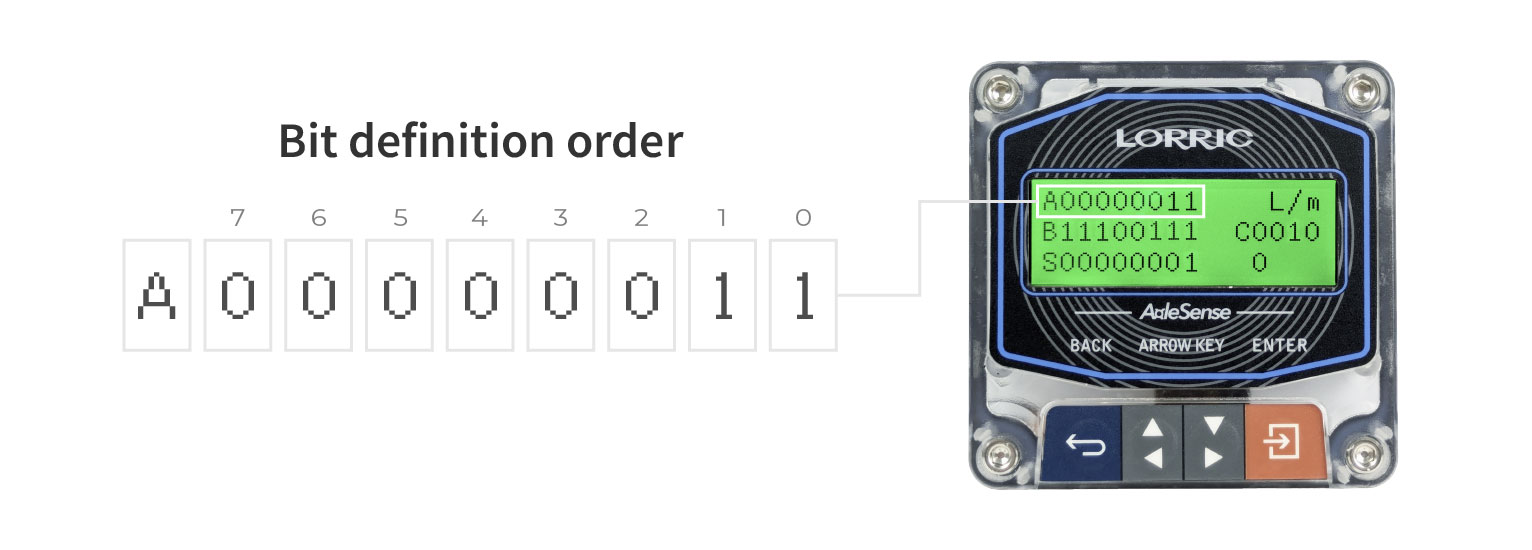
Bits are numbered from right to left, starting with **Bit 0** on the far right.\
A bit value of **1** indicates an active alarm or status. Refer to the table below for system status descriptions.
{% endhint %}

<figure><img src="/files/mQDCD59ElmuWOFgUbTxN" alt=""><figcaption></figcaption></figure>

## **Alarm - A:** Critical Failure

The system classifies this alarm according to the **“Failed” severity level** as defined in the **NAMUR NE107** standard.

This alarm is triggered under the following fault conditions:

* **Paddlewheel malfunction**
* **Magnetic field interference**
* **Internal chip or sensor error**

When Alarm - A is active, the **LCD backlight flashes red** to indicate a **critical system failure**.

<figure><img src="/files/TPfe7i5BNQt5XpmnEPnY" alt=""><figcaption></figcaption></figure>

<table><thead><tr><th width="84.08856201171875">Bit</th><th>Alarm Condition</th><th>Alarm Code</th><th>Trigger Condition</th></tr></thead><tbody><tr><td>7</td><td>　NA</td><td></td><td>　</td></tr><tr><td>6</td><td>　NA</td><td></td><td>　</td></tr><tr><td>5</td><td>　NA</td><td></td><td>　</td></tr><tr><td>4</td><td>　NA</td><td></td><td>　</td></tr><tr><td>3</td><td>　NA</td><td></td><td>　</td></tr><tr><td>2</td><td>    NA</td><td></td><td>　</td></tr><tr><td>1</td><td>Magnetic field interference</td><td>D02</td><td>Strong magnetic field detected near the device, interfering with AxleSense sensing. </td></tr><tr><td>0</td><td>Paddle wheel abnormality</td><td>D01</td><td>Paddle rotation cannot be detected. Verify the paddlewheel is rotating freely, the pipe is filled with liquid, and the paddlewheel assembly is undamaged. </td></tr></tbody></table>

### **Alarm - B: Out of Specification**

This alarm indicates that the **flow meter is operating outside of its designed specification range**.\
The severity level is recommended to follow the **“Out of Specification” category** as defined in the **NAMUR NE107** standard.

This alarm is typically used to signal:

* **Flow exceeding user-defined thresholds**
* **Other notable operating conditions that require attention**

The thresholds and logic can be configured in the **D-series parameters**.

When Alarm - B is active, the **LCD backlight turns solid red**, indicating a non-critical but attention-required condition.

<figure><img src="/files/f6T4Rgoj1L3pbRszEpMT" alt=""><figcaption></figcaption></figure>

<table data-header-hidden><thead><tr><th width="107"></th><th></th><th width="123.4000244140625"></th><th></th></tr></thead><tbody><tr><td>Alarm bit</td><td>Error Content</td><td> Alarm Code</td><td>Alarm trigger</td></tr><tr><td>7</td><td>    NA</td><td></td><td>　</td></tr><tr><td>6</td><td>Totalised Flow Exceeds Target </td><td>D08</td><td>Totalized flow exceeds or falls below the preset target<mark style="color:red;">*</mark></td></tr><tr><td>5</td><td>Value exceeds analog output upper limit</td><td>D11</td><td>The output value exceeds the analog output upper limit</td></tr><tr><td>4</td><td>Value exceeds analog output lower limit</td><td>D11</td><td>The output value falls below the analog output lower limit</td></tr><tr><td>3</td><td>　NA</td><td></td><td>　</td></tr><tr><td>2</td><td>Pulse Overlap</td><td>D13</td><td>Paddlewheel pulse frequency is too high; consecutive pulse signals overlap. </td></tr><tr><td>1</td><td>Instantaneous flow above upper limit</td><td>D04</td><td>Instantaneous flowrate exceeds the upper limit</td></tr><tr><td>0</td><td>Instantaneous flow below lower limit</td><td>D04</td><td>Instantaneous flowrate falls below the lower limit</td></tr></tbody></table>

<mark style="color:red;">\*</mark> Configure via **D08 Total Ala**, **D09 Total Trig**, and **D10 Total Target**.

{% hint style="info" %}
**D04 FlowLIM Ala** default setting is **Off** (value = 0). Set **D04** to **On** (1) or **Do not disturb** (2) to enable flow limit alarm monitoring. Refer to the **D Alarm & Info** parameter section for full configuration details.
{% endhint %}

### **Alarm - C: Maintenance Required**

This alarm indicates that the **flow meter requires maintenance**.\
The recommended severity level follows the **“Maintenance Required” classification** as defined in the **NAMUR NE107** standard.

When Alarm - C is active, the **LCD backlight remains solid red**, alerting the user to perform **preventive or corrective maintenance**.

<figure><img src="/files/ZipyRtzuanWmvBwa079c" alt=""><figcaption></figcaption></figure>

<table data-header-hidden><thead><tr><th width="118.20001220703125"></th><th width="171.4000244140625"></th><th width="154.59991455078125"></th><th width="170.199951171875"></th></tr></thead><tbody><tr><td>Alarm bit</td><td>Error Content</td><td>Alarm Code</td><td>Alarm trigger</td></tr><tr><td>7</td><td>　NA</td><td></td><td>　</td></tr><tr><td>6</td><td>　NA</td><td></td><td>　</td></tr><tr><td>5</td><td>　NA</td><td></td><td>　</td></tr><tr><td>4</td><td>　NA</td><td></td><td>　</td></tr><tr><td>3</td><td>　NA</td><td></td><td>　</td></tr><tr><td>2</td><td>    NA</td><td></td><td>　</td></tr><tr><td>1</td><td>Analog Output Line Fault</td><td>D14</td><td>Analog output (4–20 mA) line resistance is too high, or the wiring is disconnected. Check all analog output wiring connections. </td></tr><tr><td>0</td><td>　NA</td><td></td><td>　</td></tr></tbody></table>

{% hint style="info" %}
**D14 IoutStatAla** default setting is **Off** (value = 0). Set **D14** to **On** (1) or **Do not disturb** (2) to enable analog output line monitoring. This parameter is new in firmware P1002.
{% endhint %}

### **Alarm - D: Function Check**

This alarm indicates that the device is **currently undergoing configuration, simulation, or other manual intervention** and is **not actively monitoring** in real time.

The recommended severity level follows the **“Function Check”** category as defined in the **NAMUR NE107** standard.

When this condition is active, **bit 1** of the alarm register is set to **1**, indicating **the system is not in monitoring mode due to user interaction**.

During this state, the **LCD backlight will remain solid amber (orange)** to indicate the flow meter is in a **non-operational configuration mode**.

<table data-header-hidden><thead><tr><th width="119"></th><th width="177"></th><th width="146.79998779296875"></th><th width="154.79998779296875"></th></tr></thead><tbody><tr><td>Alarm bit</td><td>Error Content</td><td>Alarm Code</td><td>Alarm trigger</td></tr><tr><td>7</td><td>　NA</td><td></td><td>　</td></tr><tr><td>6</td><td>　NA</td><td></td><td>　</td></tr><tr><td>5</td><td>　NA</td><td></td><td>　</td></tr><tr><td>4</td><td>　NA</td><td></td><td>　</td></tr><tr><td>3</td><td>　NA</td><td></td><td>　</td></tr><tr><td>2</td><td>　NA</td><td></td><td>　</td></tr><tr><td>1</td><td>    NA</td><td></td><td>　</td></tr><tr><td>0</td><td>The host is not on the monitoring screen</td><td>NA</td><td>　</td></tr></tbody></table>

### **System Status**

The **system status** is represented as an **0\~7 bit status code**, with each bit indicating a specific operating condition or state of the device.

<figure><img src="/files/AlKB1qupygdmhCGxScpS" alt=""><figcaption></figcaption></figure>

<table data-header-hidden><thead><tr><th width="96.6875"></th><th></th><th></th><th></th></tr></thead><tbody><tr><td>Alarm bit</td><td>Error Content</td><td>Alarm Code</td><td>Alarm trigger </td></tr><tr><td>7</td><td>　NA</td><td></td><td>　</td></tr><tr><td>6</td><td>　NA</td><td></td><td>　</td></tr><tr><td>5</td><td>　NA</td><td></td><td>　</td></tr><tr><td>4</td><td>　NA</td><td></td><td>　</td></tr><tr><td>3</td><td>　NA</td><td></td><td>　</td></tr><tr><td>2</td><td>　NA</td><td></td><td>　</td></tr><tr><td>1</td><td>    NA</td><td></td><td>　</td></tr><tr><td>0</td><td>　NPN On State</td><td>E01</td><td><p>NPN status: </p><ul><li>NC - Normally Closed (allows current flow) shows “1”</li><li>NO - Normally Open (no current flow) shows “0”</li></ul><p><br>Not including Paddle Pulse status</p></td></tr></tbody></table>


---

# Agent Instructions: Querying This Documentation

If you need additional information that is not directly available in this page, you can query the documentation dynamically by asking a question.

Perform an HTTP GET request on the current page URL with the `ask` query parameter:

```
GET https://docs.lorric.com/qr/fp-as310-english-v5/user-interface/alarm-priority-and-display-method.md?ask=<question>
```

The question should be specific, self-contained, and written in natural language.
The response will contain a direct answer to the question and relevant excerpts and sources from the documentation.

Use this mechanism when the answer is not explicitly present in the current page, you need clarification or additional context, or you want to retrieve related documentation sections.
